10 Best Cribl Alternatives for 2026
Most teams looking at Cribl alternatives have already run the numbers. Cribl Stream works, and it created this category when nothing else existed.
But the commercial model around it is what sends teams looking for alternative tools. The bill grows with your data, and collection, search, and storage are three more products to buy.
Every telemetry pipeline asks you to accept the same trade. You buy a layer to cut what your log platform takes in. Then you fund and run that layer too.
In this blog, you will see:
Ten alternatives compared: Scored on where processing runs, what each one includes, and how it is priced. Cribl sits in the table as the baseline.
A full review of every tool: Where it fits, where it does not, and how it stacks up against Cribl.
The four types of Cribl alternative: Picking your type cuts the shortlist faster than any feature grid.
Cribl's real pricing mechanics: What a credit is worth, what meters, and where published pricing stops.
By the end, you will know which two or three deserve a trial on your own data.
What Is Cribl and What Does Cribl Stream Do?
Cribl sells four telemetry products. Cribl Stream is the one most people mean. Stream is a processing engine between your sources and your destinations. It routes, reduces, reshapes, and enriches data in flight. It can send one stream to several destinations at once, and replay stored data during an investigation.
The other three cover the stages around it. Cribl Edge collects. Cribl Search queries data where it sits. Cribl Lake stores it in its original format.
We think the structure matters more than any one feature. Collection, processing, search, and storage are four products, and Cribl's own billing docs give each one its own invoice line. A team that wants all four is buying a platform.
Why Do Teams Look for Cribl Alternatives?
Teams look for Cribl alternatives for four reasons, and each one points at a different replacement.
1. The Bill Grows With the Data
Cribl prices in credits, and one credit equals one US dollar. Stream costs 0.32 credits per GB on a Cloud Worker. A Hybrid Worker costs 0.26. Edge costs 0.21 credits per GB per node. Lake charges 0.05 credits per GB when Cribl manages storage, or 0.02 when you do.
Billing runs on ingress only, so routing to more destinations costs nothing extra.
The part we see teams underestimate is that volume is only one of the two things you pay for. Cribl's docs list infrastructure as its own invoice item, measured in Worker Group hours per MB/s. The compute you provision bills alongside the data you push through it. So the tool you bought to control telemetry costs gets more expensive as your telemetry grows.
2. Published Pricing Stops at the Free Tier
Cribl publishes three editions. Free covers up to 1 TB a day with no license. Standard covers up to 5 TB a day. Enterprise is unlimited and adds a dedicated 24x7 support team.
Above the free tier, there are no list prices. The pricing page points you to a sales rep instead. That is a normal way to sell enterprise software. It is also why buyers reach a comparison page before they have a number to compare.
3. The Pipeline Is a Layer You Have to Run
Cribl gives you deep control over processing, and control is work. The routes, filters, and transforms are yours to write and validate. When a vendor changes a log format upstream, the ticket lands with your team.
Then there is the worker tier underneath, with its own sizing, scaling, and upgrade path. We have watched lean teams call that one system too many. The platform behind it already handles log indexing and retention.
4. On-Premises and Air-Gapped Estates Have Fewer Paths
Cribl supports its cloud, hybrid worker groups, and connected on-premises setups. Some suite features are marked unavailable in Cribl.Cloud, so deployment shapes the feature set as well as the bill.
For defense, government, and regulated estates, the question is simpler. Can configuration or telemetry touch a vendor-hosted control plane at all? Where the answer is no, the field narrows toward tools built on-premises first.
How Did We Evaluate These Cribl Alternatives?
We scored these ten tools on vendor documentation, live pricing pages, and public G2 and Gartner Peer Insights ratings. Everything here was checked in August 2026.
Five criteria carried the most weight.
Where processing runs: On the source agent, in a central worker tier, or inside the destination. This drives cost, latency, and how much infrastructure you operate.
Whether detection is built in: Some tools shape data and pass it on. Others test it against thresholds and baselines while it is still in flight.
How retention and tiering work: Where filtered data lands, and whether indexing and retention are one decision or two.
Whether it replaces your log platform: A pipeline that sits in front of your platform means two vendors and two bills. A platform with the pipeline built in means one of each.
Pricing model: Per GB, per host, per data source, or against an annual commitment. What matters is whether the bill tracks your growth.
One warning covers every page on this topic, ours included. Almost every published Cribl comparison is written by a vendor selling an alternative. Their performance multiples are self-measured, on setups the vendor picked. Treat a 12x or 20x claim as marketing until someone independent repeats it.
What Are the Four Types of Cribl Alternatives?
Cribl alternatives fall into four types, and picking your type beats comparing features across all ten. Tools inside a type compete with each other. Tools in different types answer different questions.
Here is what separates them.
Platforms that build the pipeline in: Motadata ObserveOps, Dynatrace, and SolarWinds Observability. The processing stages sit inside the platform that indexes, stores, and searches the data.
Standalone commercial pipelines: Edge Delta and Chronosphere Telemetry Pipeline. These are Cribl's closest peers, and they differ mainly on where processing happens.
Pipelines native to a platform you already pay for: Datadog Observability Pipelines and Splunk Edge Processor. You add no new vendor, and you give up some freedom over where data can go.
Security-first data pipelines: Axoflow, Realm, and NXLog Platform. These are built around SIEM cost, detection coverage, and security source types.
Most buyers work through the other three types before considering the first one, and it is often the type they needed. Say your log platform costs too much. A second product in front of it treats the symptom and adds a vendor. Teams on a unified observability and IT service management platform run that math differently. We see the same pattern across log file analysis tools.
The 10 Best Cribl Alternatives Compared
Here is a quick overview of all ten, with Cribl as the baseline row so every column reads against it.
Tool | Best For | Where Processing Runs | Storage and Search Included | Deployment | Pricing Model |
Cribl (baseline) | Large estates wanting maximum routing control | Central worker tier, plus Edge at source | Separate products (Lake and Search) | Cloud, hybrid, connected on-premises | Credits per GB, 1 credit = $1 |
1. Motadata ObserveOps | Teams wanting the pipeline inside the log platform | Inside the platform, across eight stages | Yes, index tiers carry their own retention | On-premises, private cloud, public cloud, six modes | Quote-based |
2. Dynatrace | Large estates wanting automated root cause | OpenPipeline on ingest, plus Bindplane collectors | Yes, Grail with retention control | SaaS, managed, data residency options | Annual commitment drawn down on a rate card |
3. SolarWinds Observability | Hybrid estates consolidating network and app tools | In the platform, on ingest | Yes, log monitoring built in | SaaS and Self-Hosted, bridged by Platform Connect | Subscription, quote-based |
4. Edge Delta | High-volume teams wanting automation over rules | On source-side agents | Yes, own backend | SaaS, private deployment on Custom | Free tier, Pro $20/mo, Custom |
5. Chronosphere Telemetry Pipeline | Fluent Bit and Kubernetes-heavy estates | Fluent Bit agents at source | Separate Chronosphere platform | Data plane local, control plane hosted | Not published |
6. Datadog Observability Pipelines | Estates already centered on Datadog | In transit, managed | Via Datadog and archive destinations | SaaS with on-premises processing | Not published separately |
7. Splunk Edge Processor | Splunk-only estates cutting index volume | Near source (Edge) or pre-index (Ingest) | Yes, Splunk itself | Requires a Splunk Cloud Platform deployment | Part of Splunk licensing |
8. Axoflow | Security teams wanting automated normalization | Agent and pipeline, policy driven | Yes, AxoLake and AxoStore | Cloud and on-premises | Tiered, figures not published |
9. Realm | SOCs cutting SIEM cost without losing detections | Cloud-native, single-tenant data plane | Yes, Data Haven retention layer | Cloud-native only | Average daily ingestion |
10. NXLog Platform | On-premises, air-gapped, Windows and OT estates | At the source agent, plus central | Yes, built-in store with SQL-like search | On-premises, hybrid, air-gapped | Per data source, volume independent |
Now here is a closer look at each one, including where it does not fit.
Detailed Overview of the 10 Best Cribl Alternatives in 2026
Now, let's look at these 10 alternatives to Cribl in detail, so you can compare their pros, cons, and key features.
1. Motadata ObserveOps
Best for: Teams that want the pipeline configured inside the platform that stores and searches the logs.
Rating: G2 4.7/5, Gartner Peer Insights 4.6/5
ObserveOps runs the pipeline as eight stages inside the log platform. Each stage is a rule you write once, and every event arriving afterward is handled by it.
The ordering is what we find people miss. Exclusion sits at stage six, after log policies at four and metric generation at five. You decide what to drop where detection is already configured, not at the front door. Filtering at read time means the volume already landed and got indexed. Excluding here means it never lands.
Indexing is the other structural difference. An index carries its own filter and its own period for log retention, so configuring one settles both decisions. Short-lived operational events and long-lived audit evidence never end up in the same tier.
Pros
- No separate processing tier: There is no worker fleet to size, scale, or upgrade.
- Detection and exclusion share a home: Filters and policies live in one place. You cannot drop a log that an active rule still depends on.
- On-premises is genuinely covered: Six deployment modes, including high availability and disaster recovery.
- OpenTelemetry-native ingestion: OTLP traces, metrics, and logs arrive natively, next to 100+ integrations.
- Logs correlate with metrics and flows: A log spike is tied to the host that produced it and to the traffic around it.
Cons
- You take the whole platform: Some teams want only a routing layer in front of the log platform they already run. That is the opposite architecture.
- Pricing is quote-based: There is no public per-GB rate to compare against the metered tools here.
- Agentless collection ships four profiles: AWS, Azure, Windows, and VMware vCenter are what the documentation covers today.
- Smaller footprint in this category: Cribl has years of recognition and a far larger community pack library.
- The pipeline is built around logs: Cribl Stream carries metrics and traces through the same configuration. ObserveOps handles those elsewhere in the platform.
Pricing: Quote-based, tied to data volume and deployment mode. A free trial is available.
A star rating compresses a lot into one number. Here is how the platform reads to a team running it daily.
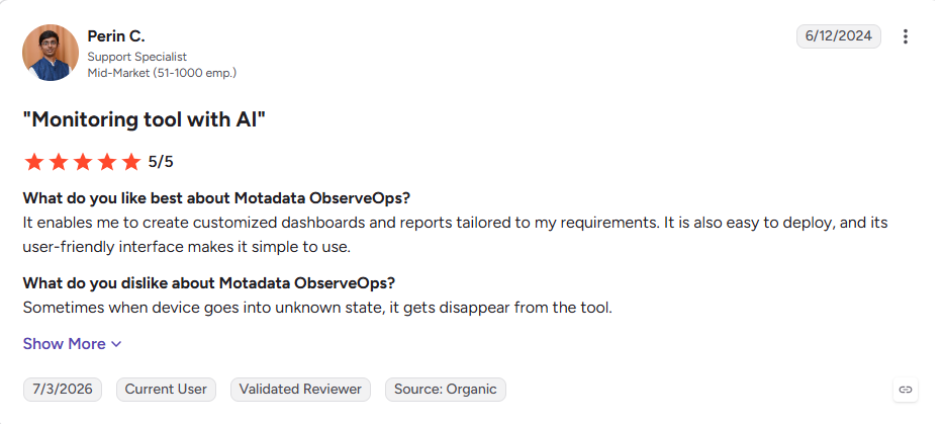
You can read the rest of the ObserveOps reviews on G2.
2. Dynatrace
Best for: Large estates that want automated root cause, with data shaping handled on ingest.
Rating: G2 4.5/5, Gartner Peer Insights 4.6/5
Dynatrace removes the need for a separate pipeline by doing the work itself. OpenPipeline filters, masks, and enriches data on the way in, then routes it into Grail buckets where you set retention. There is nothing to put in front of the platform, because the platform already does that job.
In April 2026, Dynatrace agreed to acquire Bindplane. That added a collector layer at the edge, on top of the processing it already ran on ingest. No other backend vendor now controls that much of the route from source to storage.
That raises a fair question for anyone who valued Bindplane's independence. A pipeline sold on neutrality now belongs to a company that also sells the destination.
Pros
- Pipeline and platform under one contract: Shaping, storage, and analysis stop being three purchases.
- Every capability unlocks on day one: The subscription opens all generally available features rather than gating them per module.
- Seats are not metered: Adding people to the platform costs nothing extra.
- OTLP ingest is native: Metrics and traces arrive over OpenTelemetry without a translation layer.
Cons
- Neutrality is now a fair question: Bindplane sold itself as a pipeline independent of any backend. A backend vendor now owns it.
- An annual commitment comes first: You size the spend before you know what you will consume.
- The rate card has many lines: Hosts, logs, traces, sessions, and synthetics each meter differently, so forecasting a bill takes effort.
- Support is priced separately: Enterprise support runs as a percentage of product fees, subject to a minimum fee.
Pricing: Dynatrace Platform Subscription, an annual spend commitment drawn down against a published rate card. Full-Stack Monitoring is $58 per month, Infrastructure Monitoring $29, and Foundation and Discovery $7. Log Analytics runs pay-per-query or bundled at $0.02 for retention with queries included.
How it compares with Cribl: Cribl routes data to whichever backend you choose and never stores it. Dynatrace is the backend, and it shapes data on the way in. You give up vendor neutrality and get one contract and one place to configure the pipeline.
3. SolarWinds Observability
Best for: Hybrid estates consolidating network and application tools, where self-hosted is non-negotiable.
Rating: G2 4.3/5, Gartner Peer Insights 4.3/5
SolarWinds comes at this from the network side, which sets it apart from the rest of this list. We think that origin explains most of what it does well and what it does not. Most Cribl alternatives grew out of log volume problems. SolarWinds grew out of network monitoring, and the platform pulls application, database, network, infrastructure, and log data into one place.
The deployment split is what makes it relevant. Teams that cannot move everything to a vendor cloud can run part of the estate themselves. They still see all of it in one interface, and few platforms here support that.
Pros
- Self-hosted is a supported product: SolarWinds sells and maintains it alongside the SaaS edition.
- Network heritage runs deep: Decades of on-premises network monitoring sit underneath the platform.
- Consolidation is the point: One platform replaces several single-domain tools.
- A 30-day trial is fully functional: You can test against real telemetry before talking to anyone.
Cons
- There is no pipeline layer: You cannot shape, drop, and route data before it lands the way Cribl does.
- Telemetry arrives and stays: The platform is built to hold your data. Forwarding it onward to a third-party SIEM is not its job.
- SaaS and Self-Hosted are two products: Platform Connect links them, and you still run and upgrade two things.
- Pricing is quote-based: There is no published rate to model against a per-GB pipeline.
Pricing: Subscription, quoted per environment. A fully functional 30-day free trial is available.
How it compares with Cribl: These two do very different jobs. They come up together because they answer the same budget problem. Cribl exists to cut what a platform takes in. SolarWinds exists to be the platform. Teams weigh one against the other while deciding something broader. Consolidate tools, or add a layer in front of the ones you already have.
4. Edge Delta
Best for: High-volume teams that want source-side processing with automated recommendations instead of hand-written rules.
Rating: G2 4.4/5, Gartner Peer Insights 4.0/5
Edge Delta is Cribl's closest architectural peer and the other established name here. Its agents shape and filter data at the source, as it is created. Nothing travels through a central worker tier first, which is the design choice we would weigh hardest.
Check the pricing yourself before trusting an older comparison. Other pages still quote a per-GB entry rate. That rate no longer appears on the live page, which has been rebuilt around AI teammates.
Pros
- Published entry pricing: Most tools in this list disclose no rate at all, so a flat monthly figure is unusual.
- Automation over manual rules: The platform recommends what to keep and what to drop, so your engineers write fewer rules.
- Storage is included: Retention does not need a second purchase.
Cons
- The SaaS backend is a dependency: Private deployment sits behind Custom, so it is not air-gapped by default.
- Enterprise pricing is still gated: The published plans stop short of petabyte scale.
- The platform has repositioned: Pricing now leads with AI teammates, so check which plan actually carries the pipeline features you need.
Pricing: Hobby is free with a 14-day trial. Pro is $20 a month. Custom covers strict compliance, private deployments, and petabyte scale.
How it compares with Cribl: Both cut telemetry before it reaches a backend. Edge Delta does that work on the agents and automates the keep-or-drop calls. Cribl does it in a worker tier you configure by hand.
5. Chronosphere Telemetry Pipeline
Best for: Fluent Bit and Kubernetes-heavy estates that want commercial management without a proprietary agent.
Rating: G2 4.5/5. Not separately rated on Gartner Peer Insights.
Chronosphere Telemetry Pipeline is built on Fluent Bit and comes from the team behind Calyptia. If your estate already runs Fluent Bit agents, this adds a management layer without asking you to replace them.
Keeping your existing agents is the reason we would shortlist it. A Playground also lets you test a pipeline away from production before it ships. In our experience a bad configuration change is the most common way collection breaks.
Pros
- Open standards throughout: Fluent Bit and OpenTelemetry rather than a proprietary agent.
- Commercial support on an open core: You keep the ecosystem and gain a management layer.
- Kubernetes-native architecture: Components scale individually rather than as one system.
Cons
- Storage lives elsewhere: The pipeline carries no retention layer of its own.
- Observability-leaning: Security source coverage is thinner than the security-first tools here.
- Pricing is not published: Every figure comes from a sales conversation.
Pricing: Not published.
How it compares with Cribl: Chronosphere bets on an open-source core with a commercial control plane. Cribl ships its own engine end to end. Chronosphere also publishes efficiency comparisons against Cribl, and those are vendor-run rather than independent.
6. Datadog Observability Pipelines
Best for: Estates already centered on Datadog that want a managed pipeline without adding a vendor.
Rating: G2 4.4/5, Gartner Peer Insights 4.5/5
Datadog Observability Pipelines refines logs, metrics, and traces before routing them onward. It is OTEL and OCSF compatible. That compatibility earns its keep whenever a SIEM expects one schema and your sources emit another.
Migration is its strongest case, and we rate it highly there. Adopting a new SIEM usually leaves a window where you cannot see everything. Shipping to both destinations at once removes that window.
Pros
- No extra vendor for a Datadog estate: One contract, one support relationship.
- Strong compliance tooling: Rules covering PCI, GDPR, HIPAA, and CCPA ship with the product.
- Deploy-time safety: Simulation and Live Capture cut the risk of a bad change.
Cons
- It pulls you toward Datadog: The value case weakens sharply if Datadog is not already your main platform.
- No published standalone price: Cost arrives through a Datadog quote.
- It commercializes a free engine: The same technology is available as Vector, the open-source pipeline Datadog maintains, at no license cost.
Pricing: Not published separately. A 14-day free trial covers the wider Datadog suite.
How it compares with Cribl: Both are managed pipelines with a console. Cribl is deliberately backend-neutral and sells the pipeline alone. Datadog sells it as part of the platform your data already heads toward.
7. Splunk Edge Processor and Ingest Processor
Best for: Splunk-centric teams that want native data reduction with no additional vendor.
Rating: G2 4.3/5, Gartner Peer Insights 4.5/5. Both scores cover the wider Splunk platform, which is where these processors sit.
If your destination is Splunk, you may not need a third-party pipeline at all. Edge Processor runs on a machine in your own network, and Ingest Processor does the same work in Splunk Cloud.
There is a catch, and Splunk documents it on its own help pages. Edge Processor is not enabled by default. Access needs a support case plus a cloud change management form. A Splunk Cloud Platform deployment is mandatory too. It acts as identity provider and as the store for the processors' own telemetry. Teams weighing a wider move usually read about Splunk alternatives at the same time.
Pros
- No new vendor or contract: The capability sits inside a platform you already license.
- Zero new query language: SPL2 removes most of the learning curve.
- Public sector path: FedRAMP Moderate availability matters for government estates.
Cons
- Access is gated: Provisioning takes a support case, not a settings toggle.
- It is not vendor neutral: A Splunk Cloud Platform deployment is required underneath.
- Limited non-Splunk destinations: An estate routing to Kafka, S3, and several SIEMs will outgrow it.
Pricing: Included in Splunk licensing, with no separate published rate.
How it compares with Cribl: Splunk's processors only make sense when Splunk is the destination. Plenty of teams pick Cribl precisely because they do not want the pipeline tied to one vendor.
8. Axoflow
Best for: Security teams that want normalization and reduction handled automatically rather than through hand-maintained parsing rules.
Rating: Not rated on G2. 4.8/5 on Gartner Peer Insights
Axoflow is built by the original creators of syslog-ng, whose work on that project goes back to 1998. The platform itself launched in 2023, built on syslog-ng and OpenTelemetry.
Parser maintenance is the part we would look at hardest, because it is the chore nobody budgets for. That is the whole argument for a classification-driven engine over a regex library you own and keep patching.
Pros
- Deep syslog heritage: The team has been building log collection software since 1998.
- Storage in open formats: Parquet and OCSF keep retained data portable.
- On-premises is supported: The data lake runs in your environment as well as theirs.
Cons
- Young platform: On the market since 2023, so the reference base is far smaller than Cribl's
- Pricing figures are not published: Tiers are called transparent, yet no rates appear on the site.
- Security-weighted: The automation is tuned for security sources, so general observability routing gets less attention.
Pricing: Tiered, with figures on request.
How it compares with Cribl: Cribl hands you a toolkit and expects your engineers to build the transforms. Axoflow argues the transforms should already exist and stay maintained. Both positions are defensible, and they suit different teams.
9. Realm
Best for: Security operations centers cutting SIEM cost that need evidence the cuts did not break a detection.
Rating: Not rated on G2 or Gartner Peer Insights.
Realm is a security data pipeline founded in 2024 and scoped deliberately to security telemetry. Because it reads your detection rules as well as your log sources, it can do something no other tool here does. It can tell you which logs a detection depends on before you drop them.
The rules also come from your data rather than a generic pack. Realm samples a connected source, works out which fields carry the volume, then proposes filtering for your team to approve. We rate the coverage report as the part worth testing, since it turns a cost decision into something you can defend.
Pros
- Filtering comes with proof: The coverage report is what you hand an auditor asking whether a cost cut hurt monitoring.
- Fast deployment: Live in 7 to 10 days with no professional services engagement.
- Retention is not an extra product: Filtered data stays searchable by default.
Cons
- Security telemetry only: It does not replace a pipeline carrying observability and IT data.
- The youngest tool here: Founded in 2024, with a correspondingly short track record.
- No FedRAMP authorization: Realm states this itself, and Cribl holds it through Cribl.Cloud Government.
- Cloud-native only: There is no on-premises path.
Pricing: Based on average daily ingestion, with figures on request.
How it compares with Cribl: Cribl shows what a rule drops through Data Preview. Checking whether that hurts a detection is your job. Realm makes that check a gate the change must pass. Cribl gives up that safety net and covers IT and observability data that Realm deliberately leaves alone.
10. NXLog Platform
Best for: Regulated, Windows-heavy, and OT estates that cannot route configuration or data through a vendor-hosted control plane.
Rating: 4.3/5 on G2. 4.0 on Gartner Peer Insights
NXLog Platform is an on-premises telemetry pipeline that runs in hybrid and air-gapped networks. One agent covers collection and aggregation, since any agent can be made a relay. That keeps the architecture smaller than a two-product split.
Windows and OT depth is where it separates from everything else here. Most tools in this list treat Windows as one source type among many. Industrial control systems they leave alone. NXLog treats both as first-class inputs, and in our experience that decides plant and utility deals on its own.
Pros
- Volume-independent licensing: The bill does not climb with every extra gigabyte.
- Genuine air-gap support: Few tools here run with no vendor connectivity at all.
- Retention included: Filtered data stays queryable without a separate purchase.
Cons
- On-premises first: A fully managed SaaS option is on the roadmap rather than available.
- Analytics are shallower than a SIEM: NXLog says so itself, and detection engineering still wants a dedicated platform.
- You run the infrastructure: The control you gain is paid for in servers, upgrades, and staff time.
Pricing: Per data source and volume independent, with figures on request.
How it compares with Cribl: Cribl is consumption-priced and processes through a central worker tier. NXLog runs entirely on your infrastructure and licenses per source. You trade managed convenience for control and a bill that does not follow your data curve.
Which Cribl Alternatives Work Best for Security Operations?
Three tools here are built for security operations: Axoflow, Realm, and NXLog Platform. What separates them is the constraint each one solves for. Cribl serves security teams well, so start by naming the constraint Cribl cannot meet in your environment.
Match the constraint to the tool.
Data and configuration cannot leave your network: NXLog Platform is the only genuinely air-gap capable option here.
You must prove a filter did not break a detection: Realm validates every proposed cut against live detection rules.
Your team spends its week maintaining parsers: Axoflow takes that work off your plate for supported sources.
Your SIEM is Splunk and nothing else: Splunk Edge Processor cuts index volume without adding a vendor.
We would settle one thing before any of them. Cutting SIEM ingest is a detection risk before it is a cost saving. Only one tool here treats it that way by default. Whichever you pick, decide up front how you will prove that nothing you dropped was feeding a live detection.
How Do You Choose the Right Cribl Alternative?
Start from the constraint you cannot compromise on. We build our own shortlists this way. That single answer clears most of the list before any feature comparison begins.
Your Situation | Where to Start | Why |
The log platform bill is the real problem, and a second product in front of it feels like the wrong fix | Motadata ObserveOps | Pipeline stages sit inside the platform that indexes and searches, so there is no second vendor or worker tier |
You want automated root cause and will trade neutrality for one contract | Dynatrace | OpenPipeline shapes data on ingest, and Bindplane adds collector management at the edge |
Network and infrastructure monitoring is the bigger problem, and self-hosted is required | SolarWinds Observability | Self-Hosted is a real deployment, bridged to SaaS through Platform Connect |
You want automation instead of hand-written routing rules | Edge Delta | Processing runs on source-side agents with recommended keep-or-drop decisions |
You are Fluent Bit and Kubernetes heavy | Chronosphere Telemetry Pipeline | Commercial fleet management on an open-source core you already run |
Datadog is already the center of your stack | Datadog Observability Pipelines | No new vendor, and dual shipping covers a SIEM migration cleanly |
Splunk is your only destination | Splunk Edge Processor | Native SPL2 reduction before indexing, with no extra contract |
Parser maintenance is eating your security engineering time | Axoflow | Classification-driven processing with vendor-maintained parsers |
You must prove filtering did not reduce detection coverage | Realm | Every cut is validated against live detections before it ships |
You are air-gapped, Windows-heavy, or running OT | NXLog Platform | On-premises first, with native Windows and industrial control system collection |
Every row above resolves to the same question. Are you buying a layer to sit in front of your log platform, or a platform that makes the layer unnecessary?
When Is Cribl Still the Right Choice?
Cribl is still the right answer in several situations, and a comparison that pretends otherwise is not worth trusting. Reach for it when breadth and maturity matter more than the shape of the bill.
You need day-one integration breadth: Hundreds of sources and destinations plus years of community packs is hard to match.
One pipeline must serve IT, observability, and security: Most tools above are deliberately narrower, and several say so themselves.
Your security engineers want to own every transform: Cribl gives them more room than the automated alternatives do.
Backend neutrality is the point: Two platforms in this list now own their own pipeline layer. Cribl refuses to own a destination at all.
You are mid-contract with everything running: Ripping out a working pipeline is rarely right. We would run one noisy source through an alternative alongside it instead.
There is also a free path worth using first. Cribl's free tier processes up to 1 TB a day with no license. We would use it first. That is enough to test whether a pipeline solves your problem at all.
Pick the Cribl Alternative That Matches Your Architecture
Answer the layer-or-platform question first and the shortlist writes itself. We would start with Motadata ObserveOps when the log platform bill is what sent you looking. The observability pipeline stages run inside the platform that indexes and searches the data.
It is not right for everyone. Teams committed to a backend-neutral routing layer are better off where they are. So are mixed estates that need Cribl's integration breadth.
What none of these tools can settle for you is how much of your data was ever worth keeping. That answer only appears once real telemetry has run through a real pipeline. It rarely matches what the team expected going in.
FAQs
What are the alternatives to Cribl?
The main alternatives are Motadata ObserveOps, Dynatrace, SolarWinds Observability, Edge Delta, Chronosphere, Datadog Observability Pipelines, Splunk Edge Processor, Axoflow, Realm, and NXLog Platform. They split into platforms that absorb the pipeline, standalone pipelines, platform-native options, and security-first tools.
Is there a free version of Cribl?
Yes. The Free edition processes up to 1 TB a day with no license required. Sandboxes cover Stream, Edge, Search, and Lake. Above that, Standard and Enterprise pricing is not published and comes through a sales conversation.
Is Cribl a SIEM?
No. Cribl Stream is a pipeline that routes and reshapes telemetry before it reaches a SIEM. Search and storage are separate Cribl products. It reduces what your SIEM takes in rather than running detection rules itself.
How much does an observability pipeline cost?
The models vary more than the prices. Cribl meters credits per GB, Dynatrace draws down an annual commitment, Realm charges on average daily ingestion, and NXLog licenses per data source. Check whether the model tracks your data growth before comparing headline figures.
Is Motadata ObserveOps a good Cribl alternative?
It suits teams that want the pipeline inside the log platform rather than in front of it. Ingestion, detection, log-to-metric conversion, exclusion, indexing, and forwarding are configured once as one flow, with on-premises deployment across six modes.
Author
Ramya Shah
Technical Writer
Ramya Shah is a technical content writer with a computer engineering background and roots in automotive journalism. He covers IT Service Management, observability, IT operations, and AI-driven automation. An early adopter of AI-assisted writing workflows, he turns complex IT processes into clear, engaging content optimized for search and answer engines (AEO), lifting content output and organic visibility.