Observability in DevOps: How to Build Visibility Into Every Stage of Your Pipeline
Observability in DevOps defined: DevOps observability is the practice of instrumenting applications and infrastructure to produce telemetry data — logs, metrics, and traces — that lets teams understand system behavior, trace deployments through production, and resolve incidents before users are affected.
A deployment went out at 2:17 PM. By 2:34 PM, checkout latency doubled. The team's monitoring dashboard showed all green — CPU normal, memory fine, error rates within threshold. Seventeen minutes of degraded user experience, invisible to every alert they'd configured.
The problem wasn't a missing alert. It was a missing practice. The team had monitoring. They didn't have observability.
In a DevOps workflow where code ships multiple times per day, every deployment is a potential incident. Observability is what lets you trace that deployment through your pipeline, into production, and across every service it touches — so when something degrades, you know exactly where, when, and why.
Key Takeaways
DevOps observability isn't just monitoring in a DevOps context — it's the practice of making every deployment, every service interaction, and every infrastructure change visible and traceable.
The three pillars (logs, metrics, traces) are necessary but not sufficient for DevOps. You also need deployment event correlation, CI/CD pipeline visibility, and service dependency mapping.
Observability should shift left — instrument during development, not after production incidents. Teams that instrument early catch 40% more issues in staging.
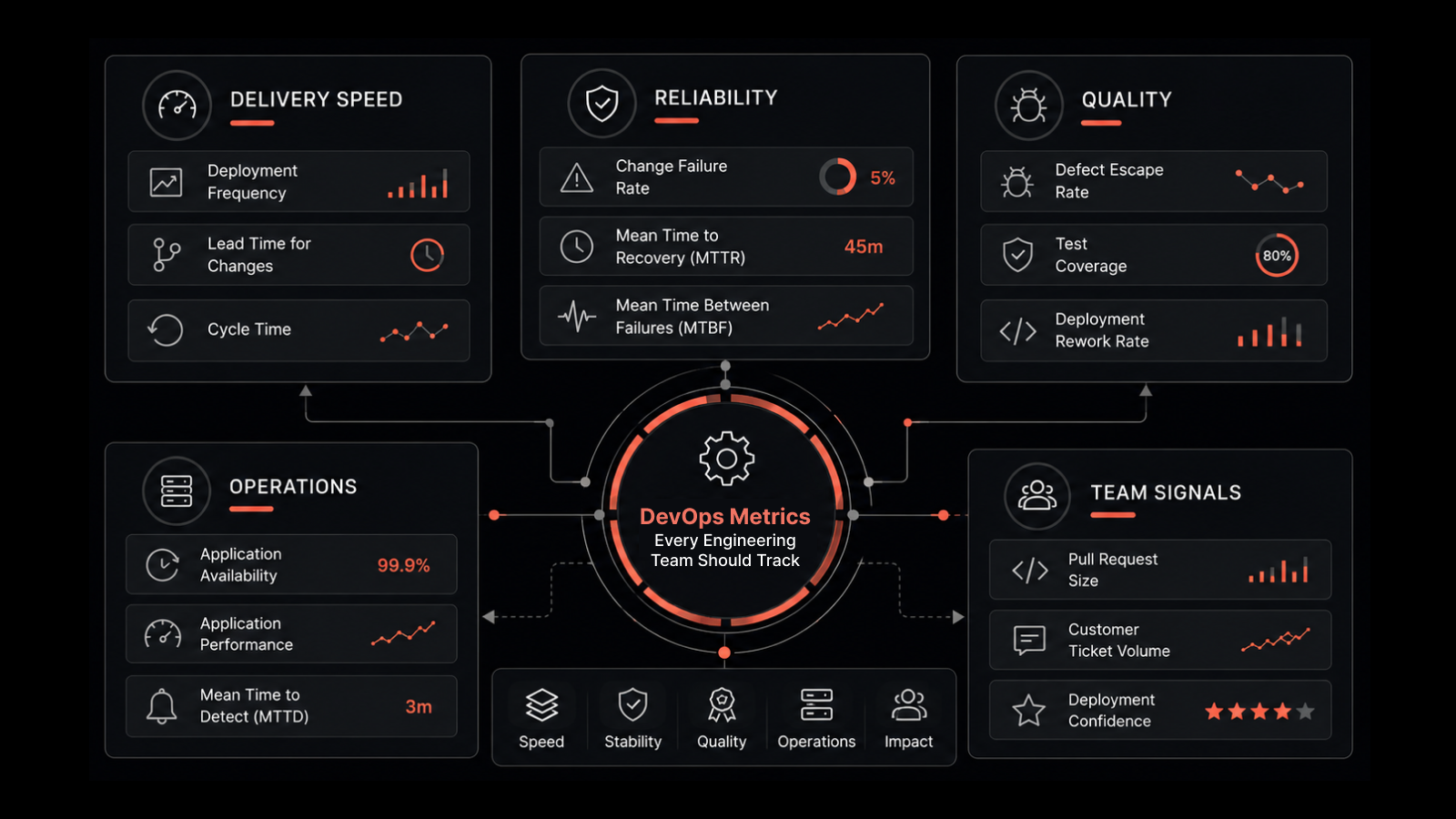
DORA metrics (deployment frequency, lead time, change failure rate, MTTR) are directly improved by better observability — they measure what observability enables.
SRE and DevOps observability overlap heavily. SLOs, error budgets, and incident response all depend on high-quality telemetry data.
The biggest DevOps observability mistake isn't under-instrumenting — it's collecting data without correlating it. Uncorrelated logs and metrics are just expensive storage.
What Is Observability in DevOps?
Observability in DevOps is the ability to understand what's happening inside your applications and infrastructure at any point — during development, deployment, and production operation.
A system is observable when your team can answer questions like:
"Did this deployment change the P95 latency for the checkout service?"
"Why are 3% of requests to the search API timing out since yesterday's config change?"
"Which downstream services are affected by the database connection pool exhaustion?"
If you can't answer these from your existing telemetry data, you have a visibility gap — and that gap will show up as longer incident resolution times, riskier deployments, and frustrated engineers.
How DevOps Observability Differs from General IT Monitoring
Traditional IT monitoring watches infrastructure — CPU, memory, disk, network. DevOps observability watches the entire software delivery pipeline and runtime:
Layer | What to Observe |
|---|---|
CI/CD Pipeline | Build times, test pass rates, deployment frequency, rollback rates |
Application | Request latency, error rates, throughput, dependency health |
Infrastructure | Resource utilization, container orchestration, auto-scaling events |
User Experience | Page load times, transaction completion rates, real user metrics |
Business | Conversion rates, revenue per transaction, feature adoption |
DevOps observability connects these layers so you can trace a code change from commit to customer impact.
Why DevOps Teams Need Observability
Deployments Are the #1 Cause of Incidents
Research consistently shows that 60-70% of production incidents are caused by changes — deployments, config updates, infrastructure modifications. If you can't correlate a deployment event with a performance change, you're debugging blind.
Observability lets you overlay deployment markers on your telemetry timeline. When latency spikes 8 minutes after a deploy, the connection is visible immediately.
Microservices Make Debugging Exponentially Harder
A monolithic application has one log file and one process to debug. A microservices architecture spreads a single user request across 5, 10, or 50 services. Without distributed tracing, finding where a request failed is like searching for a needle in a haystack — except the haystack is distributed across three data centers.
Faster Deployment Frequency Demands Faster Feedback
Teams deploying once a month can afford slow debugging. Teams deploying 10 times a day can't. Observability provides the real-time feedback loop that makes rapid deployment sustainable — deploy, observe impact, confirm or rollback.
SRE Practices Require Observable Systems
Site Reliability Engineering depends on SLOs (Service Level Objectives) and error budgets. You can't manage an error budget if you can't measure it. You can't set meaningful SLOs without reliable telemetry. Observability is the data foundation that SRE practices run on.
The Three Components of DevOps Observability
1. Event Logs
Logs capture discrete events — deployments, errors, security events, configuration changes, user actions. In DevOps, structured logging is essential: use JSON-formatted logs with consistent fields (timestamp, service name, trace ID, severity) so they're queryable at scale.
DevOps best practice: Include the deployment version and environment in every log entry. When debugging, you need to know instantly which code version generated each log line.
2. Metrics
Metrics are numerical measurements over time. For DevOps, the critical metrics go beyond infrastructure:
DORA metrics: Deployment frequency, lead time for changes, change failure rate, MTTR
Application metrics: Request rate, error rate, latency (RED method)
Infrastructure metrics: CPU, memory, disk, network per service
SLO metrics: Availability, latency percentiles, error budget remaining
DevOps best practice: Use SLAs and SLOs to determine which metrics deserve alerts and which are informational only. Alert on SLO burn rate, not raw thresholds.
3. Distributed Traces
Traces follow a request through every service it touches. For DevOps teams, tracing is what connects a user-facing symptom to the internal root cause.
DevOps best practice: Implement OpenTelemetry (OTel) for vendor-neutral instrumentation. Instrument at the application level to capture service-to-service calls, database queries, and external API requests.
How to Implement Observability in Your DevOps Workflow
Step 1: Shift Observability Left
Don't wait until code is in production to think about observability. Instrument during development:
Add structured logging to every service
Implement trace context propagation across service calls
Define SLOs before the service ships — not after the first incident
Include observability review in code review checklists
Step 2: Instrument Your CI/CD Pipeline
Your pipeline is infrastructure too. Observe it:
Build stage: Track build duration, test execution time, flaky test rates
Deploy stage: Record deployment events, canary analysis results, rollback triggers
Post-deploy: Correlate deployment markers with production metrics
Step 3: Establish Deployment Correlation
Connect every deployment event to its production impact. The AIOps platform should automatically overlay deployment markers on metrics timelines, so teams can instantly see whether a release changed system behavior.
Step 4: Define SLOs and Error Budgets
Move from "is it up?" to "is it meeting user expectations?"
SLO example: "99.9% of checkout API requests complete in under 300ms over a 30-day window"
Error budget: 0.1% of requests can exceed 300ms before the SLO is breached
Alert on burn rate: If you're consuming error budget 10x faster than expected, alert immediately
Step 5: Build Incident Response Workflows
When an incident occurs, observability should feed directly into your response:
Alert fires (monitoring layer)
Engineer opens the observability platform
Correlate the alert with recent deployments, config changes, and infrastructure events
Trace affected requests to identify the failing component
Identify root cause, remediate, and confirm recovery
Document findings for post-incident review
DevOps Observability Anti-Patterns to Avoid
Collecting without correlating: Logs in one tool, metrics in another, traces in a third. Without cross-correlation, you have three separate views of a single problem.
Over-alerting: Every metric gets a threshold. Every threshold generates an alert. Engineers drown in noise and start ignoring alerts entirely. Use SLO-based alerting instead.
Observing infrastructure but not applications: CPU and memory monitoring is necessary but insufficient. Application-level telemetry — request rates, error rates, latency, trace data — is where most DevOps debugging happens.
Ignoring the pipeline: CI/CD is infrastructure. If you can't observe build times, deployment events, and test results alongside production metrics, you're missing a critical correlation.
What DevOps Leaders Should Also Understand About Observability
How does observability improve deployment confidence?
By providing immediate feedback on every deployment's production impact. Teams can deploy more frequently because they know they'll see problems within minutes — not hours. This directly improves DORA metrics: higher deployment frequency with lower change failure rates.
What's the relationship between observability and SRE?
SRE practices depend on observability data. SLOs require reliable metrics. Error budgets require accurate measurement. Incident management requires correlated telemetry for fast root cause analysis. You can't practice SRE without observability.
Should we use OpenTelemetry?
Yes, if you're starting fresh or re-instrumenting. OTel is the industry standard for vendor-neutral instrumentation. It ensures you're not locked into a single observability vendor and supports all three telemetry types (logs, metrics, traces).
How does AI/ML enhance DevOps observability?
AI/ML adds anomaly detection (catch deviations without manual threshold-setting), automated event correlation (connect related alerts across services), and predictive analysis (forecast capacity issues before they impact users). These capabilities are essential when data volume exceeds what humans can process manually.
How Motadata Powers DevOps Observability
Motadata's AI-native platform was built for the kind of correlated, cross-stack visibility DevOps teams need. It unifies metrics, logs, flows, APM, and Real User Monitoring into a single console — so deployment events, infrastructure metrics, and application traces live in the same timeline.
AI/ML-powered anomaly detection catches deployment regressions that threshold-based alerts miss. Dynamic topology mapping shows service dependencies automatically. And automated event correlation connects related signals across your entire stack, cutting root cause identification from hours to minutes.
If you're building or maturing your DevOps observability practice, request a demo to see how Motadata accelerates your team's ability to deploy with confidence.
FAQs
What is observability in DevOps?
Observability in DevOps is the practice of instrumenting applications, infrastructure, and CI/CD pipelines to produce telemetry data (logs, metrics, traces) that gives teams full visibility into system behavior. It goes beyond monitoring by enabling investigation of unexpected problems, tracing requests across distributed services, and correlating deployments with production impact.
What are the three pillars of DevOps observability?
Logs (timestamped event records), metrics (numerical performance measurements), and distributed traces (request paths through services). For DevOps specifically, you also need deployment event correlation, CI/CD pipeline observability, and SLO/error budget tracking built on top of these pillars.
How does observability improve DevOps MTTR?
Observability reduces MTTR by eliminating the manual investigation that slows incident response. Instead of grepping logs across 20 services, engineers trace affected requests, see correlated events on a single timeline, and identify root cause in minutes. Teams with mature observability report 60-70% MTTR reduction.
What's the difference between monitoring and observability in DevOps?
Monitoring checks known metrics against thresholds and alerts when something deviates. Observability lets you investigate any question about system behavior — including problems you didn't anticipate. In DevOps, where deployments happen frequently and failures are unpredictable, observability's exploratory capability is essential.
How does Motadata support DevOps observability?
Motadata provides a unified observability platform that combines metrics, logs, APM, and Real User Monitoring with AI/ML-powered anomaly detection and automated event correlation. It integrates deployment events, infrastructure data, and application traces in a single timeline — giving DevOps teams the correlated visibility they need to deploy confidently and resolve incidents fast.
Author
Motadata Team
Content Team
Articles produced collaboratively by our engineering and editorial teams bear the collective authorship of Motadata Team.