What is SRE Observability and Key Pillars You Should Know?
What happens when a critical service slows down, but nothing is technically “broken”?
Most teams have monitoring in place. They know when something goes down. But when performance drops or issues spread across services, finding the real cause becomes slow and unclear.
Engineering teams end up switching between dashboards, logs, and alerts just to understand what changed. This delays response and increases pressure on on-call teams.
This is where SRE observability becomes essential.
It helps teams understand system behavior in context, connect signals across services, and reduce the time needed to identify and resolve issues.
In this guide, we will explore SRE observability, how it differs from monitoring, and how it supports core SRE practices like SLOs, SLIs, and error budgets. We will also look at the key signals, common challenges, and a practical approach to adoption.
What is SRE Observability?
SRE observability is the practice of instrumenting a system so its internal state can be understood through its external outputs.
It combines three core types of telemetry data with site reliability engineering practices:
Metrics
Logs
Traces
Together, these help engineering teams answer two critical questions at any moment: what is broken right now, and why.
The concept of observability originates from control theory, where it describes how well a system’s internal state can be inferred from its outputs. In modern IT systems, it has become more practical and operational.
A system is considered observable when an engineer can ask a new question about it, one that was not predefined, and still get a meaningful answer without changing the code.
That is the real standard.
Monitoring tells you something is wrong.
Observability helps you understand:
What changed
Where it changed
Why it changed
For example, monitoring may tell you a checkout service is slow. Observability helps you trace the request across services, identify the failing dependency, and understand how the issue started upstream.
For SRE teams, this practice is what makes large-scale reliability manageable.
It directly supports:
Error budgets that guide release decisions
On-call response during incidents
Without it, teams often react without context, which increases recovery time and operational load.
In simple terms, SRE observability turns complex system behavior into something engineers can investigate, understand, and act on with confidence.
If you want a broader take that covers the topic outside the SRE context first, our piece on what observability is is a useful primer before going deeper here.
Monitoring vs Observability: Know the Key Differences in Detail
Let’s understand monitoring and observability quickly in the following table.
Aspect | Monitoring | Observability |
Definition | Collects predefined system signals and alerts on known conditions | Enables understanding of system behavior through data exploration |
Primary Goal | Detect when something goes wrong | Explain why something is going wrong |
Approach | Rule-based and threshold-driven | Exploratory and investigative |
Signals Used | Known metrics like CPU, memory, error rate, latency | Metrics, logs, traces, and their relationships |
Question Answered | “Is the system healthy?” | “Why is the system behaving this way?” |
Failure Type Covered | Known and expected failures | Unknown, complex, and emergent failures |
Example | Alert when CPU > 90% or error rate > 1% | Trace a slow request across multiple services to find root cause |
Monitoring focuses on predefined conditions. It works well when failure patterns are already known and measurable. For example, high CPU usage, memory spikes, or increased error rates.
Observability goes further. It helps engineers investigate system behavior when the problem is not obvious or predefined. It connects signals across services to explain how and where an issue started.
In modern distributed systems, failures are often not isolated. They emerge from interactions between services, APIs, queues, and external dependencies.
Teams that drop the second end up paging humans for symptoms they cannot diagnose. For a fuller side-by-side, our walkthrough of the difference between monitoring and observability goes deeper.
If you are still working out how observability data should actually feed your reliability decisions, our guide to SRE error budgets is the next stop before the rest of this piece.
What are the Three Pillars of Observability?
Observability rests on three kinds of telemetry data. They each answer a different question, and they each carry a cost profile that matters when you are deciding what to collect and how long to keep it.
1. Metrics
Metrics are numeric measurements over time. Request rate, latency, CPU, memory, queue depth, cache hit ratio. They are cheap to store (a few bytes per data point), they aggregate well, and they are what dashboards and alerts are typically built on. A well-instrumented service exposes a few dozen metrics. An over-instrumented one exposes thousands and nobody knows what most of them mean.
The strength of metrics is precision over time. You can chart the 99th percentile of checkout latency across the last 30 days and spot the regression that landed two weeks ago. The weakness is loss of context. A metric tells you the value, not the why.
2. Logs
Logs are timestamped records of discrete events. They carry the context that metrics flatten: which user, which request, which error message, which stack trace. When an SRE is debugging a specific incident, logs are usually where the answer lives.
The trade-off is cost. Logs are expensive to store, slow to query at scale, and easy to over-generate.
Most teams we work with cut their log volume by 40 to 60 percent within the first quarter of moving to a unified platform, mostly by dropping debug-level logs in production and structuring what is left. (The single best thing a team can do for log cost is to structure the logs as JSON or another typed format, so the platform can index by field instead of grepping by string.)
3. Traces
A trace is the full path of a request as it moves through the system: every service it touched, every span of work inside that service, every database call along the way. It is the pillar that distributed architectures actually need, because once a request crosses three or four service boundaries, no metric or log on its own can tell you which boundary slowed it down.
If the concept is new, our entry on distributed tracing covers the mechanics. The short version: each service stamps the request with a trace ID, every operation gets a span, and a backend reconstructs the full tree so an engineer can see the slow span at a glance.
Traces are the most expensive of the three to instrument well, and the most useful for cross-service problems. Most teams sample, keeping a small fraction of full traces plus all traces that hit an error or a latency threshold. Sampling is not a workaround. It is the strategy.
What are the Important Signals in Observability?
The four golden signals are Google's distillation of the metrics any user-facing service should be measuring. If you only have time to instrument four things, instrument these:
Latency: How long requests take, with successful and failed requests tracked separately. A 500 error returned in 8 milliseconds is a different problem from a 200 returned in 12 seconds.
Traffic: Demand on the system, in whatever unit fits (requests per second, concurrent users, transactions per minute).
Errors: The rate of failed requests, both explicit (5xx) and implicit (a 200 returned with the wrong payload).
Saturation: How full the system is, focused on whichever resource is closest to its limit (CPU, memory, IO, connection pool).
Our deeper walkthrough of the four golden signals covers each one in detail. The piece you are reading is more about how to use them.
Here is the alert hygiene rule that matters more than the signals themselves.
Alert on symptoms, not causes. A user does not care that your database has 12 stuck connections. A user cares that checkout is slow. Page on the symptom (slow checkout), then use the causes (the stuck connections, the spiking GC pause, the saturated network link) as debugging inputs once an engineer is already awake.
This sounds simple, and almost no team does it cleanly the first time. The most common failure mode looks like this: a team adds an alert every time something breaks, the alert pile grows to 200 rules, half of them never fire and the other half are flaky, and the on-call engineer learns to ignore the inbox. Page fatigue follows. Then the next real incident slips through because nobody trusts the alerts anymore.
A useful filter for any alert rule is the three-question test: is this condition urgent, is it actionable, and is it user-visible? If all three are yes, page someone.
If one is no, send it to a dashboard or a ticket queue instead. (Most teams that audit their alerts find that 60 to 70 percent should not be pages.)
One honest trade-off. Symptom-based alerting takes slightly longer to detect very specific failure classes. A cause-based alert (the cache is at 95% memory) will fire before the user sees anything go wrong.
A symptom-based alert (checkout p99 is over 3 seconds) fires only once something has degraded. Most SRE teams accept the lag in exchange for fewer false pages, because false pages are the bigger reliability risk over time.
How Observability Powers SLOs, SLIs, and Error Budgets
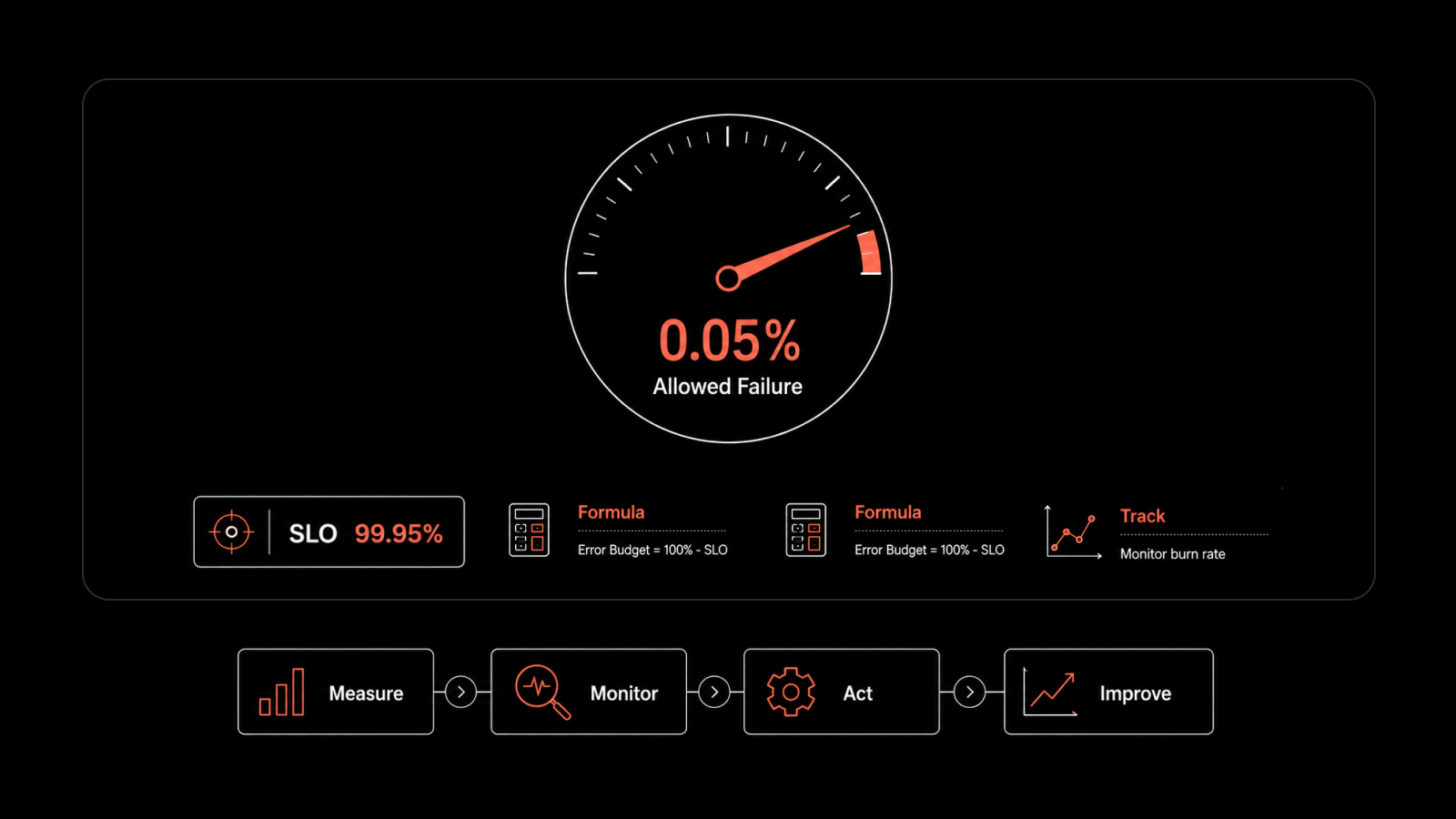
Observability data is only as valuable as the decisions it informs. For an SRE team, those decisions are organized around three connected ideas: service level indicators, service level objectives, and error budgets.
Term | Definition | Purpose | Example | Key Takeaway |
Service Level Indicator (SLI) | A quantitative measure of service performance from the user's perspective. It tracks how reliably a service delivers the expected experience. | To measure actual service quality and reliability. | Availability SLI: 99.95% of requests completed successfully. Latency SLI: 98.8% of requests responded within 400ms. | SLIs tell you how the service is performing. They are the metrics that matter most to users. |
Service Level Objective (SLO) | A target level of performance defined for an SLI over a specific time period. It establishes the expected reliability standard for a service. | To set clear reliability goals and align engineering efforts with business expectations. | Availability SLO: 99.9% successful requests over a rolling 30-day period. Latency SLO: 99% of requests served within 400ms. | SLOs define the reliability target you aim to achieve, not perfection. Setting a 100% SLO is usually impractical and costly. |
Error Budget | The amount of unreliability or failure allowed while still meeting the SLO. It is calculated as the difference between 100% and the SLO target. | To balance innovation and reliability by defining how much risk the team can safely take. | If the availability SLO is 99.9%, the error budget is 0.1%. Over a 30-day period, that equals approximately 43 minutes of total downtime. | Error budgets help teams decide when to move fast and release changes and when to focus on stability and incident reduction. |
Observability is what makes this loop actually run. Without granular telemetry, you cannot compute SLIs accurately. Without accurate SLIs, your SLO is aspirational rather than measured. Without a measured SLO, the error budget is a conversation rather than a control system. Our piece on how SLOs become the rhythm of observability covers the full mechanic.
The teams that get this right tend to share a few habits. They tie every SLO to a specific user-visible signal, not an internal metric.
They review SLO performance in the same forum where they review feature roadmaps, so the trade-off between reliability and velocity is explicit. And they let the error budget govern release pace honestly, even when it is uncomfortable. The discipline is what distinguishes SRE from operations work that happens to use the same tools.
What are the Common Challenges in SRE Observability and How to Avoid Them?
The practice fails in predictable ways. Knowing the shape of the failure helps a team avoid most of them. Five pitfalls show up in nearly every observability journey we see:
1. Alert Fatigue
This is the most common failure and the most damaging. When the pager fires more than a few times per shift, on-call engineers stop responding with urgency, and real incidents get missed under the noise. Our breakdown on how to avoid alert fatigue goes deeper. The short rule: any alert that has not fired in 90 days, or that fired and was ignored, is a candidate for deletion.
2. Telemetry Cost Spirals
Logs and traces, in particular, can quietly turn into a six-figure line item. We have seen teams discover that their log ingestion bill outgrew their compute bill by the time anyone noticed. Budget telemetry like any other infrastructure cost, structure logs so the platform can index them efficiently, and sample traces with intent rather than capturing everything.
3. Tool Sprawl
A team ends up with Prometheus for metrics, Loki for logs, Tempo for traces, Grafana for dashboards, PagerDuty for alerts, and a separate APM tool for application performance. Each one is fine alone. Together, an engineer at 3 a.m. has to context-switch across six interfaces to debug a single incident. The unified-platform argument exists for this reason, with the honest trade-off of vendor lock-in.
4. Instrumentation Gaps Nobody Owns
A new service ships without metrics. A new dependency gets added with no health check. Over time the gaps compound until the observability story is full of blind spots. Make instrumentation a release-gate requirement, not a follow-up ticket. (Engineering orgs that do this enforce it in code review rather than in policy documents, because the policy never gets read.)
5. Reactive-only Posture
Observability data is also a planning tool. Teams that only look at the data when something is broken miss the slow-burn signals (creeping latency, growing error rate, capacity drift) that would have warned them weeks before the outage.
What Should You Look for in an SRE Observability Tool?
Not all observability tools are built for SRE teams. The right platform should help you detect issues faster, understand their impact, and resolve them before they affect users. When evaluating solutions, focus on these capabilities.
1. Unified Visibility Across Metrics, Logs, and Traces
SREs shouldn't have to jump between multiple tools to investigate an issue. Look for a platform that brings metrics, logs, and traces together in a single view.
This allows teams to:
Identify problems faster
Trace issues back to their root cause
Reduce investigation time during incidents
2. Real-Time Monitoring and Alerting
The sooner teams know about a problem, the sooner they can respond.
Choose a platform that provides:
Real-time monitoring of services and infrastructure
Intelligent alerting based on meaningful thresholds
Alert correlation to reduce noise and duplicate notifications
Automated escalation for critical incidents
3. Support for Modern Environments
Most organizations run workloads across cloud platforms, containers, virtual machines, and on-premises infrastructure.
Your observability tool should support:
Kubernetes and containerized environments
Multi-cloud and hybrid-cloud deployments
Databases, applications, and network services
OpenTelemetry and other open standards
4. Scalability Without Complexity
Observability data grows quickly as systems expand. The platform should scale with your environment without requiring constant maintenance or significant cost increases.
Look for solutions that offer:
High-volume data ingestion
Long-term data retention options
Flexible deployment models
Predictable pricing as monitoring needs grow
5. Actionable Dashboards and Reporting
Collecting data is only useful if teams can act on it.
Effective observability platforms provide:
Customizable dashboards
Service-level views for SLI and SLO tracking
Trend analysis and capacity planning insights
Easy-to-understand reports for technical and business stakeholders
6. Automation and Incident Response Integration
Observability should help teams resolve issues, not just identify them.
Consider platforms that integrate with:
Incident management tools
ITSM platforms
Collaboration tools
Automated remediation workflows
These capabilities help reduce manual effort and improve response times during outages.
7. Focus on Operational Simplicity
A monitoring platform should reduce operational overhead, not create more work.
The best solutions are easy to deploy, simple to manage, and provide the visibility SRE teams need without requiring extensive tool maintenance.
Quick Evaluation Checklist
Before choosing an observability platform, ask:
Can it correlate metrics, logs, and traces in one place?
Does it support SLI, SLO, and error budget tracking?
Can it monitor cloud, on-premises, and containerized environments?
Does it provide intelligent alerting and automation?
Will it scale as data volumes grow?
Is pricing predictable as usage increases?
If the answer to most of these questions is yes, you're likely evaluating a platform that can support both current reliability goals and future growth.
How to Adopt SRE Observability in Stages
You do not need to land everything at once. The teams that do this successfully take a staged approach over a quarter or two, not a week. The order matters more than the speed.
1. Pick One Service That Actually Matters
Start with a user-facing service whose outage would be felt by the business within an hour. Checkout, login, search. The point is to build the muscle on a service where the work pays off immediately.
2. Instrument The Four Golden Signals First
Latency, traffic, errors, saturation. Get them flowing into a single dashboard. Resist the urge to add more metrics until those four are clean.
3. Define An Slo On The Service
Write it down. Negotiate it with the team that owns the service. Use the golden signals as the SLIs. Pick a window (30 days is a reasonable default) and compute the error budget that falls out of it.
4. Layer In Logs, Then Traces
Structured logs first, so the platform can index by field. Then traces with thoughtful sampling. Connect them to the same trace ID so an engineer can move from a slow request, to the trace, to the log line, without copy-paste.
5. Build Alerts On Symptoms
Page on user-visible failures. Send causes to dashboards. Run the three-question filter on every alert before it goes live.
6. Review Weekly, Audit Quarterly
Look at SLO performance and alert noise weekly. Once a quarter, audit the alert list and delete the dead ones. The pruning matters as much as the adding.
7. Expand Outward
Apply the same template to the next service. Then the next one. Resist the temptation to retrofit observability into the whole stack in one push.
For a longer view on how this practice matures inside an organization over years rather than quarters, our observability maturity model lays out the stages.
The roadmap is not glamorous, and the early weeks are harder than any demo suggests. (Most teams underestimate the structured-logging work by a factor of two.)
The payoff comes once the loop closes: telemetry feeds SLOs, SLOs govern the error budget, the budget governs release pace, and the on-call shift gets quieter.
Conclusion
SRE observability is effective only when telemetry is turned into action.
SLIs define what is measured, SLOs set the reliability targets, and error budgets control how fast teams can safely ship changes. Together, they keep reliability and delivery in balance. Alerts remain focused and reduce unnecessary noise.
Setting this up takes effort in instrumentation and tuning, but once established, it improves incident response and reduces operational overhead.
To explore this in your own environment, you can start with Motadata ObserveOps and see how a complete observability workflow supports SRE practices.
FAQs
What is observability in SRE?
Observability in SRE is the practice of instrumenting a system with metrics, logs, and traces so the team responsible for keeping it reliable can answer two questions on demand: what is broken and why. It is broader than monitoring, because it allows new questions to be asked of the system without shipping new code each time.
What is the difference between monitoring and observability for SRE teams?
Monitoring watches for known failure modes against known thresholds. Observability lets an engineer investigate failure modes nobody anticipated. SRE teams need both. Monitoring gives a fast signal that something is wrong. Observability gives the depth to understand why. Drop either one and the on-call rotation breaks down within a quarter.
What are the biggest challenges in SRE observability?
The recurring ones are alert fatigue from too many low-signal rules, telemetry cost spirals from unstructured logs and unsampled traces, tool sprawl across disconnected products, instrumentation gaps that nobody owns, and a reactive-only posture that ignores the slow-burn signals. Each one is solvable, but the solutions take ongoing discipline rather than a single project.
How should an SRE team get started with observability?
Start with one service that matters. Instrument the four golden signals (latency, traffic, errors, saturation). Define an SLO and compute the error budget that falls out of it. Add structured logs, then sampled traces. Build alerts on symptoms rather than causes. Review weekly, audit quarterly. Expand to the next service only after the first one is genuinely useful in an incident.
Author
Jagdish Sajnani
Senior Content Strategist
Jagdish Sajnani is a B2B SaaS content strategist and writer. He has experience across different B2B verticals, including enterprise technology domains such as IT Service Management, AI-driven automation, observability, and IT operations. He specializes in translating complex technical systems into structured, engaging, and search-optimized content. His work improves product understanding, strengthens organic visibility, and supports B2B demand generation.