What are the Key Features and Evaluation Criteria for Vulnerability Assessment Tools?
How many findings from your last vulnerability scan have been verified as fixed? For most IT functions, the scan report is easy to produce, and the proof of closure takes far longer to assemble. That difference tends to surface at the worst possible moment, usually an audit or a post-incident review.
Vulnerability assessment tools are meant to end that uncertainty. They inspect systems, match what they find against public vulnerability databases, and rank each weakness by how dangerous it is. Buying one is straightforward, and getting value from one depends almost entirely on what happens to the output afterwards.
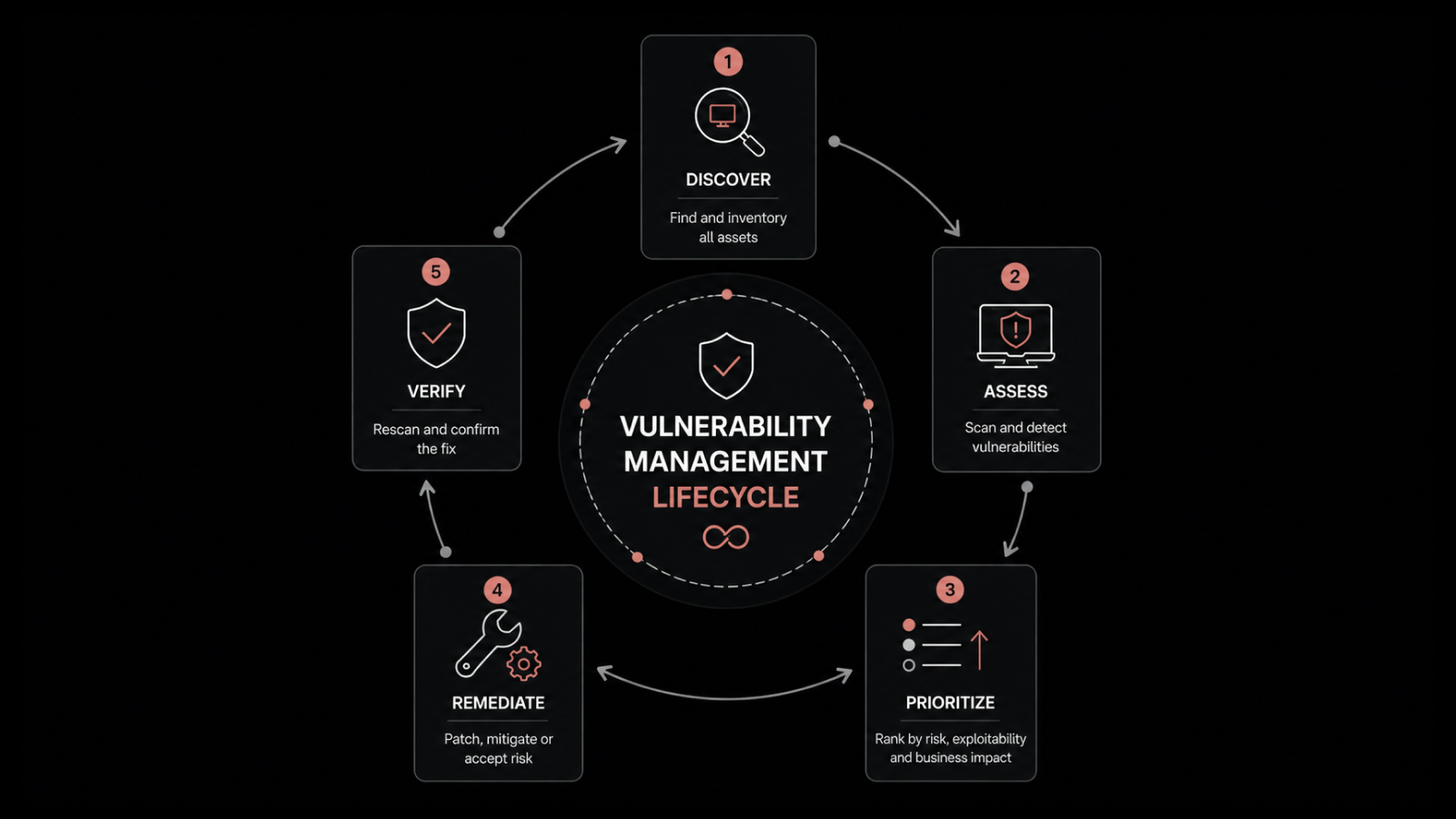
That distance between detection and correction is where most evaluations go wrong. Buyers compare scan engines, detection counts, and dashboard screenshots, then discover months later that finding vulnerabilities was never the bottleneck. Knowing how a vulnerability scan produces its findings makes the rest of the evaluation far easier to reason about.
In this blog, you will see what these tools do, how the main categories differ, the five capabilities worth checking first, how open-source options compare with commercial platforms, and the questions to put to a vendor before you sign anything.
What Are Vulnerability Assessment Tools?
Vulnerability assessment tools are software that scan systems, applications, and network devices for known security weaknesses, then rank each finding by severity, so administrators know what to fix first. The scan compares what is installed against a maintained database of publicly disclosed flaws and reports every match. Vendors label the same function as vulnerability assessment software, vulnerability scanners, or scanning tools.
The mechanics behind that comparison are simple enough to describe in one line. A scanner builds a picture of what a system is running, checks that inventory against a reference list of known flaws, and produces a record for every match it finds.
That record is what makes a vulnerability assessment useful to an IT function as well as to a security auditor. A single finding usually carries:
Identifier: The CVE reference that uniquely names the flaw
Severity rating: Critical, High, Medium, or Low, based on vendor and community scoring
Exploit status: Whether attackers are known to be using this flaw already
Affected systems: Every endpoint, server, or device carrying the weakness
Fix availability: Whether a patch or configuration change currently exists
Attackers pay close attention to that fifth line. According to the Verizon 2025 Data Breach Investigations Report, exploitation of vulnerabilities reached 20% of breaches as an initial access vector, a 34% rise over the previous year. Known flaws with published fixes account for a large share of that number.
What are the Types of Vulnerability Assessment Tools?
Vulnerability assessment tools split into five categories by what they can see, and no single category covers an entire environment. Rankings of the top vulnerability assessment tools mix these categories together, so match the category to the surface you need covered before you compare products. Most organizations end up running two or three, which is exactly why the handoff between them matters so much.
Network Vulnerability Assessment Tools
These probe devices across a subnet from the outside: firewalls, routers, switches, printers, and anything else with an IP address. They excel at spotting exposed services, weak protocols, and default credentials on hardware nobody has logged into for a year.
Host and Endpoint Scanners
Host-based security vulnerability assessment tools inspect a machine from the inside, reading its operating system version, installed software, and patch level. Because they see the actual software inventory, they produce far fewer guesses than a network probe does.
Web Application Scanners
These crawl an application the way a browser would and test inputs for injection flaws, cross-site scripting, and broken authentication logic. They belong to development and application security work more than to infrastructure operations.
Database and Cloud Configuration Scanners
Database scanners check permissions, encryption settings, and unpatched engine versions. Cloud configuration scanners look at storage permissions, identity policies, and exposed services across public cloud accounts.
ITSM-Integrated Vulnerability Assessment Tools
This category detects vulnerabilities inside the same platform that already runs the service desk, asset inventory, and patch deployment. ITSM vulnerability scanning matches a host-based scanner on detection quality, and the difference shows up at the remediation step.
How do Vulnerability Assessment Tools Work?
Vulnerability assessment tools work in four steps: build a picture of what is running, compare that picture against a vulnerability database, score each match, and report the result for action. The four steps look the same across every product on the market.
Discovery: Identify the systems, services, and installed software within scope
Comparison: Match each item against a database of publicly disclosed flaws
Scoring: Rate every match by severity, and in better tools by live exploit activity
Reporting: Group the findings so someone can act on them
What separates one scanner from another is how it carries out the first two steps. Two mechanics decide the answer: how the scanner identifies itself to the system, and how it reaches the machine in the first place.
How does Authenticated Scanning Differ from Unauthenticated Scanning?
Authenticated scanning logs in with valid credentials and reads the installed software inventory directly, while unauthenticated scanning probes from outside and infers what is running. Accuracy is where the two separate.
Unauthenticated: No credentials, probes from outside, finds exposed services fast, guesses software versions from response banners, higher false positive rate
Authenticated: Valid credentials, reads the installed software inventory directly, surfaces unpatched libraries and local privilege problems, far fewer false positives
Credentialed scanning belongs to any evaluation checklist as a baseline requirement. Keep the unauthenticated view as a periodic check on what the perimeter actually exposes.
How does Agent-Based Scanning Differ from Network-Based Scanning?
Agent-based scanning runs software on the endpoint itself and reports inventory continuously, while network-based scanning reaches devices across the wire from a central scanner. Coverage is where the two separate.
Network-based: Reaches devices across the wire, covers routers, switches, firewalls and printers, needs firewall paths and a scan window that avoids business hours
Agent-based: Installed on the endpoint, reports inventory continuously, reaches laptops off the corporate network, covers only machines where the agent is deployed
The agent model borrows from agent-based monitoring and suits distributed workforces well. Coverage then depends on deployment discipline, so the asset inventory sets the outer limit on what any scan can find.
Both mechanics decide what a scan can see. What a tool does with those findings afterwards is a separate question, and it is the one worth testing during a demo.
Which Five Capabilities Should Every Vulnerability Assessment Tool Have?
The best vulnerability assessment tools share five capabilities, and each one separates products that produce action from products that produce reports. Work through them in order during any demo.
Vulnerability database freshness: Ask how often the tool refreshes its source data and where that data comes from. Daily synchronization from a maintained repository keeps new disclosures visible within a day, and a weekly cycle leaves a window nobody can defend in an audit.
Severity and exploit prioritization: A CVSS score tells you how bad a flaw could be in theory. Pairing it with active exploit status changes the ranking completely, because a high-severity flaw under live attack outranks a critical one nobody has weaponized.
Multiple views of the same data: A security lead asks about one CVE, an administrator asks what to patch this weekend, and an auditor asks about one machine. Good tools answer all three from the same dataset without an export.
Direct handoff to remediation: Vulnerability remediation is the step that reduces exposure, and detection alone changes nothing. Check whether an approved finding can trigger a patch deployment inside the platform or whether someone re-keys it into another console.
Audit-ready reporting: Compliance work eventually asks for evidence of what was found, when it was fixed, and who approved it. Scheduled reports plus a timestamped audit log make that evidence available before the request arrives.
Standalone Scanners vs ITSM-Integrated Assessment Tools: Which Model Fits?
Standalone scanners give you depth of detection, and ITSM-integrated vulnerability assessment tools give you a shorter path from finding to fix. The right answer depends on which problem your organization currently has.
A dedicated scanner is built by a security vendor for security work. Its detection library is usually broader, its network coverage reaches devices no agent will ever run on, and its reporting speaks the language of a security operations function.
The trade appears at the boundary. Findings leave the scanner as a file, someone maps them to owners and change windows, and the fix happens in a separate patch console. That manual step is also where the same Verizon report found organizations fully remediating only around 54% of edge device vulnerabilities, at a median of 32 days.
Evaluation factor | Standalone scanner | ITSM-integrated tool |
Detection breadth | Broadest, including network hardware | Managed endpoints with an agent |
Asset context | Requires an external inventory feed | Draws on the existing CMDB record |
Remediation path | Export, then a separate patch tool | Patch approval inside the platform |
Verification | Schedule a fresh scan manually | On-demand re-scan on the same record |
Audit evidence | Assembled from two or more systems | One trail from finding to closure |
Best suited to | Security operations with dedicated staff | IT operations already running a service desk |
The two models answer different questions, which is also why patch management and vulnerability management are worth understanding as separate disciplines before you buy either one.
Open-Source vs Commercial Vulnerability Scanners: What Changes?
Open-source vulnerability scanning tools remove the license cost and replace it with engineering time. Commercial platforms invert that trade. Neither option is cheaper in absolute terms until you price the hours.
Open-source scanners suit organizations with security engineering capacity in-house. The detection content is community-maintained, the tooling is transparent enough to audit, and nothing stops you from running it across every subnet you own.
Where open source works well: Testing environments, security research, budget-constrained deployments, and organizations with staff who enjoy maintaining scan infrastructure
What it asks of you: Manual updates, tuning to suppress noise, self-built reporting, and an internal owner who carries every failure
Where commercial platforms earn the fee: Maintained vulnerability feeds, vendor support, prioritization logic, integrations, and audit-ready reporting out of the box
One category-level caution applies to both sides. A scanner only reports flaws that have already been disclosed, so a zero-day vulnerability stays invisible to every tool on this list until the disclosure lands.
What Should You Ask Before Choosing a Vulnerability Assessment Tool?
Ask questions that force a specific answer about coverage, freshness, and remediation, because every vendor says yes to the general version. These seven hold up across any vulnerability management software evaluation.
Database update frequency: How often does the vulnerability database refresh, and from which sources
Scan method: Is endpoint scanning agent-based, network-based, or both, and which operating systems are covered today
Credentialed scanning: Does the tool support authenticated scans, and what access does it need
Prioritization inputs: Does ranking use severity alone, or severity plus live exploit status plus local exposure
Remediation path: Can an approved finding trigger a patch deployment without leaving the product
Asset integration: Does it read from our existing IT asset inventory, or does it maintain a second one
Verification: How does the tool prove a fix worked, and what evidence does it produce
Push hardest on questions five and seven. Those two decide whether the tool reduces exposure or simply measures it more precisely.
Where do Vulnerability Assessment Tools Fall Short?
Every vulnerability assessment tool carries the same four limits, and a vendor who claims otherwise is worth a second look. Knowing them in advance sets realistic expectations for the deployment.
Coverage stops at the inventory: Any device missing from asset discovery goes unscanned, so the accuracy of your inventory becomes the ceiling on the accuracy of your scanning.
False positives carry a cost: Unauthenticated scans in particular flag issues that turn out to be patched or inapplicable, and triage hours belong in the total cost of the product.
Detection and correction stay separate: A tool can rank a hundred critical findings perfectly and change nothing about your exposure until someone deploys a patch and confirms the count dropped.
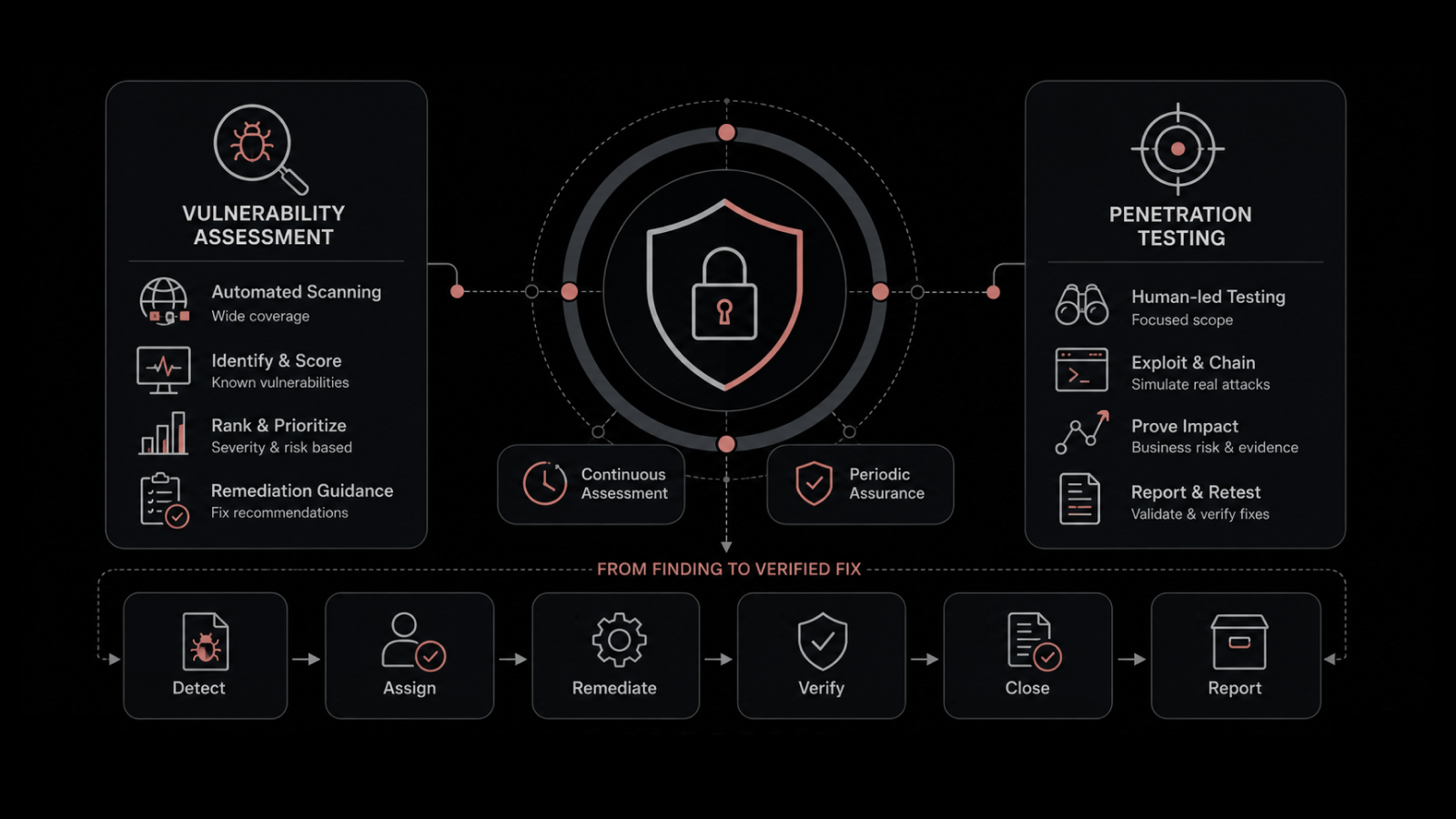
Chained attacks stay out of scope: Working out whether several low-severity findings combine into a usable attack path takes manual penetration testing, which runs on its own schedule.
Each limit is manageable once you plan around it. The one that decides value in practice is how quickly a finding reaches whoever applies the fix.
Move from a Scan Report to a Confirmed Fix with Motadata ServiceOps
Most vulnerability assessment tools hand you a prioritized list and stop at the edge of the remediation workflow. Motadata ServiceOps was built the other way around, with detection living inside the platform that already runs your service desk, asset records, and patching.
The vulnerability management software module checks enrolled endpoints against the Motadata Central Vulnerability Repository, which synchronizes daily, and produces a record carrying the CVE ID, severity, exploit status, and every affected endpoint. Findings open three ways from the same data: by patch, by individual CVE, or by endpoint. A Fixable Vulnerabilities filter puts patchable findings at the top of the queue.
Remediation runs through the integrated patch deployment module without anyone re-entering data, and running Scan Now afterwards confirms the count actually fell. Vulnerability Reports and a timestamped audit log cover the evidence side.
One point worth stating plainly: ServiceOps Vulnerability Management covers Windows endpoints today, and detection is agent-based. Organizations needing network hardware or web application coverage will still run a dedicated scanner alongside it. What ServiceOps removes is the wait between a Windows finding and a proven fix.
FAQs
What are vulnerability assessment tools used for?
Vulnerability assessment tools scan systems, applications, and network devices for known security weaknesses, then rank each finding by severity so administrators know what to address first. Most also report which systems are affected and whether a patch exists.
What is the difference between vulnerability scanning tools and penetration testing?
Scanning is automated and continuous, identifying known flaws across many systems at once. Penetration testing is a manual exercise where a skilled tester attempts to chain several weaknesses into a working attack. The two are complementary and run on different schedules.
Are open source vulnerability scanners good enough for enterprise use?
They can be, provided you have engineering capacity to maintain the scan infrastructure, tune out noise, and build your own reporting. Organizations without that capacity usually find the staff cost exceeds a commercial license.
How often should vulnerability scans run?
Continuous or daily scanning is the practical standard for managed endpoints, since new disclosures appear every day. Quarterly scanning satisfies some compliance frameworks and leaves long windows of unmeasured exposure.
Can a vulnerability assessment tool fix the problems it finds?
Detection tools identify and rank weaknesses, and fixing them requires patch deployment or a configuration change. Tools with integrated patching can trigger that deployment directly, which removes the manual handoff between systems.
Author
Poonam Lalani
Content Strategist
Poonam Lalani is a B2B content strategist and writer with a background in computer engineering and experience across enterprise technology domains, including AI, cloud, DevOps, data engineering, and IT operations. She specializes in creating research-driven content that simplifies complex ideas and supports product education, thought leadership, and business growth.