How to Patch PHP2Shell Across Every Server and Prove Each Fix to Auditors
When a critical flaw surfaces in the language behind a large share of your web applications, how quickly can your organization name every server that runs it? PHP2Shell puts that question in front of every IT leader who runs PHP. The answer decides how long the business stays exposed.
Here's the short version. PHP2Shell covers two flaws in the PHP engine, and either one lets an attacker run code on a web server with no login at all. Clean application code doesn't help, because the bug is one layer below it, and with fixed builds already out, what matters now is how fast you can inventory, roll out and prove.
Our focus here is the operations side: who finds the servers, who approves the change, who signs off the fix. We follow the same vulnerability management lifecycle you'd use for any critical flaw, and the decision table, patch workflow and checklist will work again next time.
What Is PHP2Shell?
In short, PHP2Shell is a pair of critical PHP engine bugs, tracked as CVE-2026-109618 and CVE-2026-109619. Either one lets an attacker run commands on your web server without logging in; security teams call that unauthenticated remote code execution. Each CVE scores 9.2 on CVSS v4.0, so on the CVSS score scale they're squarely critical.
Disclosure didn't go to plan. Details got out early, PHP rushed fixes out on October 21, 2026, and the two bugs turned out to work in different ways:
CVE-2026-109618: Here the weak spot is memory. Send PHP a request large enough to hit its memory limit, and the cleanup afterwards gets confused about which data is complete. That confusion is the attacker's way in.
CVE-2026-109619: Here the weak spot is cleanup between requests. A worker process can carry scraps of one request into the next, and an attacker gets to choose which scraps.
Why now, if the flawed code is years old? The researchers who disclosed it say frontier AI models made the exploit chain practical. Log4Shell played out in a similar way, with one shared component exposing every application built on it.
Is Your PHP Version Affected by PHP2Shell?
Is your server in scope? If it serves web traffic on an unpatched PHP release from 5.4.0 onward, yes, and 5.4.0 shipped back in 2012. A server built a decade ago is as exposed as one built last month.
Branch by branch, here's the picture.
PHP Branch | Where the Fix Is | What to Do |
8.2 to 8.5 | 8.5.12, 8.4.27, 8.3.36 and 8.2.35 | Update to the fixed release for your branch |
8.1, 8.0 and 7.4 | Limited source backports | Install a vendor backport and plan to upgrade |
7.3 and older | Nothing upstream | Remove internet access and migrate |
Checking by version number? Careful: Debian, Red Hat and other distros often backport the fix without changing the number, so 8.1.x alone can't tell you if a server is patched. The vendor's security notice is what confirms it.
Every common way of serving PHP is affected:
PHP-FPM: Running Nginx? Then PHP almost certainly reaches your users through PHP-FPM, and a lot of Apache servers work the same way, so this PHP-FPM vulnerability touches a large number of servers.
Apache with mod_php: Some Apache servers, usually older ones, run PHP as a module inside the Apache web server process. According to the PHP project this is the riskiest setup, since an attack can succeed before any application code executes.
php-cgi, FrankenPHP and LiteSpeed: Also in scope wherever they serve web requests.
How Serious Is the PHP2Shell Risk for Your Business?
The risk is high because PHP2Shell needs no credentials and public proof-of-concept code is already circulating. Attack attempts were reported before the fixed versions were even released. The CERT-EU advisory warns that circulating proofs of concept raise the likelihood of active exploitation.
For the business, a PHP remote code execution vulnerability on a public server creates three exposures:
Data exposure: Once attackers can run code on the server, application data, config files and stored credentials are all within reach. The flaws can leak bits of server memory as well.
Regulatory scrutiny: Under PCI DSS, HIPAA or ISO 27001, you'll be asked to show that patches went in on time, with records to back it up. Our guide to regulatory patching requirements goes into the detail.
Service disruption: Emergency maintenance on a revenue system costs money. A compromised server costs far more, since cleanup and rebuild take much longer than a planned patch.
Those exposures make PHP2Shell a leadership issue as well as an engineering one.
What Should IT Leaders Ask Their Teams About PHP2Shell?
Five questions turn a technical alert into a plan with owners, dates and evidence behind it:
Exposure: Which of our public-facing systems run PHP, and do any of them take payments or hold customer data?
Third parties: Has every hosting provider and software vendor told us, in writing, that their PHP is fixed?
Exceptions: Is there anything we can't patch this week? If so, what's covering it until then?
Timeline: What's the target date for internet-facing servers, and for everything else?
Proof: If an auditor, customer or insurer asked tomorrow, what would we show them?
We'll take these in order below. Log the answers as patch management KPIs too. Next time, you'll know how long each step took.
How Do You Find Every Server Exposed to PHP2Shell?
To find every exposed server, you need two things: a software inventory that covers all servers, and a check of what each web server is running right now. Most teams find more PHP than they expected. Check these first:
Packaged business applications: The vendor-installed ticketing or billing tool from 2019 is a common one. Many bundle their own PHP.
Content platforms: The marketing team's WordPress microsite counts. So does the Drupal intranet, and any Magento store.
Test and staging servers: A project wraps up, the staging box keeps running, and nobody remembers it's online. That's shadow IT, and it needs the patch as much as production does.
Vendor appliances and containers: PHP ships inside the image. Your package manager won't list it.
A quick example. A mid-sized retailer patches its online store on day one, since that's the system everyone remembers; the supplier portal from 2016, the vendor's helpdesk tool and the staging copy left over from a redesign all run PHP too. A plan that patches only the store leaves three exposed servers outside its scope.
PHP turns up well beyond the main website, and each location needs its own way of being found, as the map below shows.
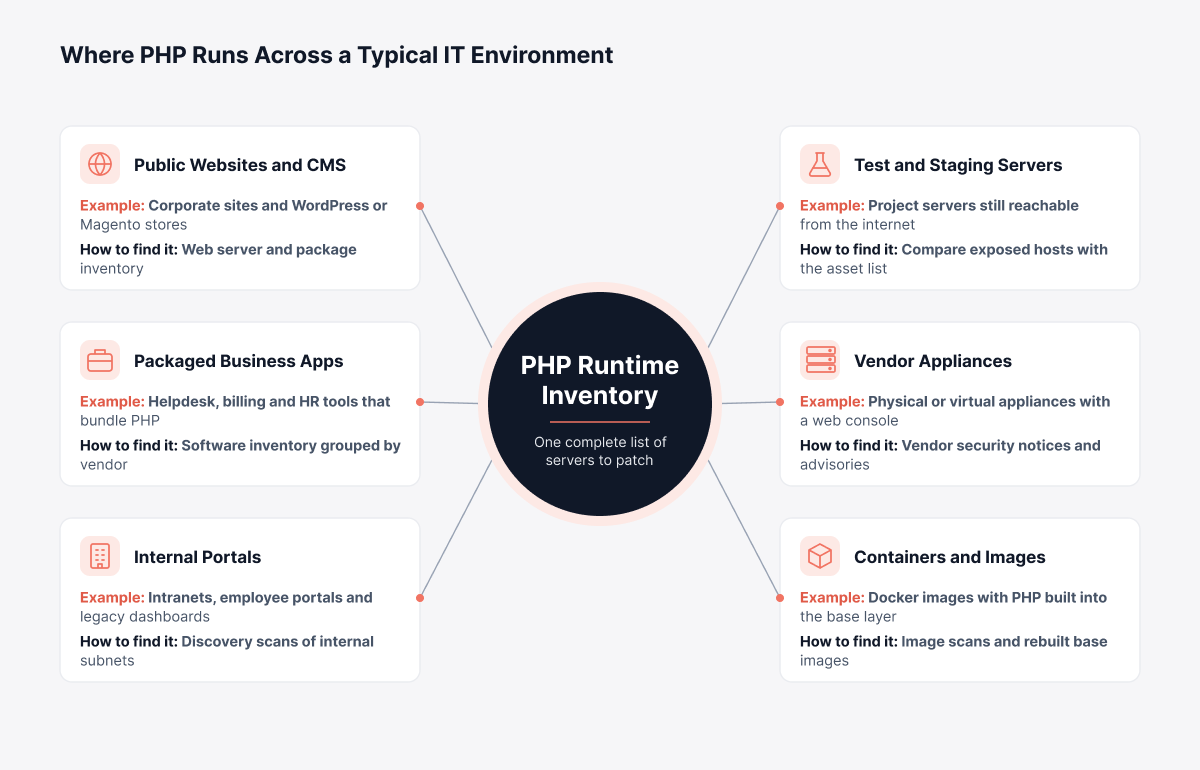
Automated asset discovery makes this much faster. Agents or agentless scans record what software is installed on each server they find, and you end up with one list of PHP installs. Our guide to IT asset discovery covers how to keep it up to date.
Need to check one server right now, or one the inventory hasn't reached? Run these on Linux to check the PHP version and packages.
Where | Command | What You'll See |
Debian, Ubuntu | dpkg -l 'php*' | Package list, so you can see each PHP version |
RHEL, CentOS, Fedora | rpm -qa 'php*' | Same package list, for Red Hat-family hosts |
Any | php -v | CLI build, which may not be what Apache or FPM runs |
Any | pgrep -a php-fpm | Live FPM processes, with config paths |
Any | apachectl -M | Loaded modules, so you can spot mod_php |
php -v only tells you about the command line. What's answering web requests shows up in the package list and the live processes, and once that list is done, ownership is next.
Who Patches PHP2Shell When Someone Else Hosts the Server?
Whoever manages the PHP runtime owns the fix. On fully managed platforms that's the provider, while on servers, virtual machines and containers you run yourself, it's you. The table maps each environment to its owner and the next action.
Environment | Who Updates PHP | Action to Take |
Managed hosting and managed WordPress | Hosting provider | Find their security notice and write down when they patched |
Platform services with managed PHP runtimes | Cloud provider | Confirm your runtime version; redeploy if they tell you to |
Virtual machines and physical servers | Your organization | Update PHP packages and restart PHP services |
Containers | Your organization | Update the base image to a patched PHP build and redeploy |
Vendor appliances and SaaS tools | Vendor | Request their fixed version number and file the answer |
Store those confirmations with your own patch records. Someone will ask about them eventually, usually an auditor.
Patch Now or Hold? Deciding What to Do With Each PHP Server
On servers you run yourself, the call depends on two answers. Does a fix exist for this PHP version? And is a maintenance window possible this week?
Server | Action | Why |
Supported branch, can take a short outage | Patch, restart PHP | Fixes the root cause |
Revenue system that can't go down today | Interim settings first, patch in the next approved window | Lowers risk, keeps the system up |
PHP 8.1, 8.0 or 7.4 | Install the vendor backport, then plan the upgrade | Routine fixes stopped for these branches |
PHP 7.3 or older | Remove internet access and migrate | Nothing upstream to install |
Dependency data helps rank servers within each row. CI relationship mapping shows which business services rely on a server, so a payment portal moves ahead of an internal wiki, and writing these rules into your patch management policy settles the debate before the next incident.
How Should You Patch PHP2Shell Safely?
The fix itself is two steps. Install a patched PHP security update from your distro or the PHP project, then restart everything that loads PHP; the hard part is doing it quickly without breaking the revenue apps you're trying to protect.
Every stage of an emergency PHP fix should leave a record behind, and the workflow below pairs each step with the evidence it produces.
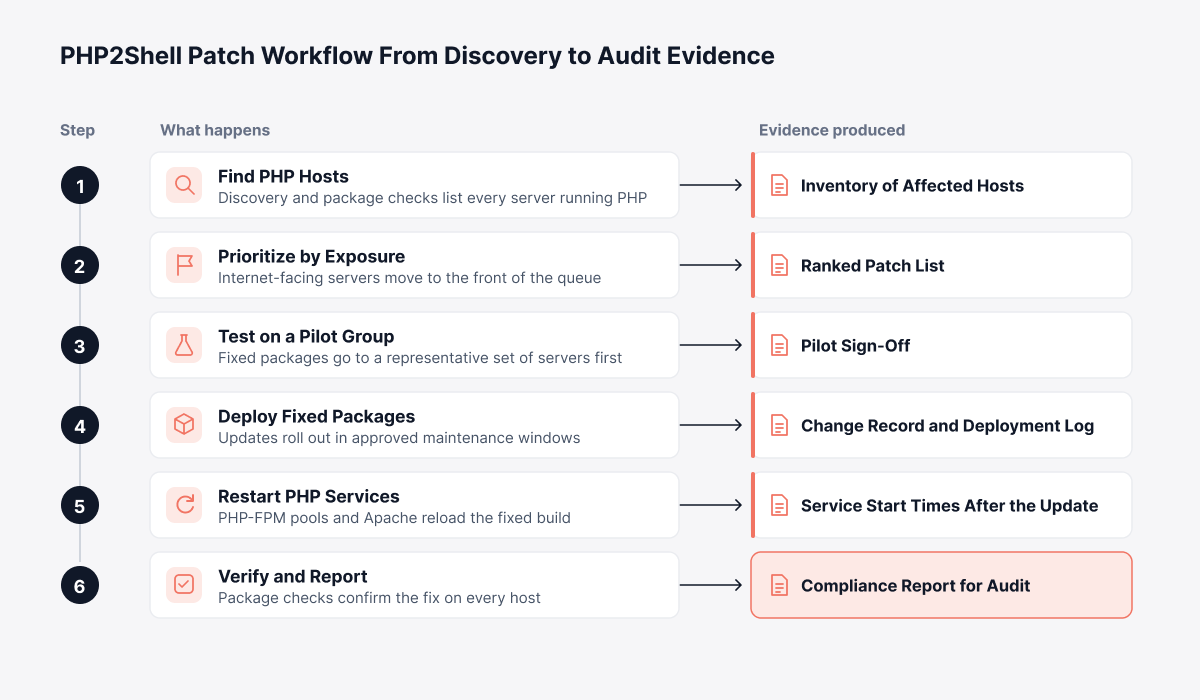
We'd run it in five steps:
Go public-facing first: Websites, customer portals and checkout pages lead. Internal tools come next, and test environments last.
Use your distribution's packages: Your distro's security notices name the fixed PHP packages, and apt, yum or dnf does the update. If PHP was compiled from source, rebuild it against the fixed release (our guide to Linux patch management covers repository setup).
Test on a pilot group: Patch three or four servers that mirror the fleet and run through the key applications. Testing with exploit code? Stick to trusted sources, since fake proof-of-concept code circulated during the disclosure.
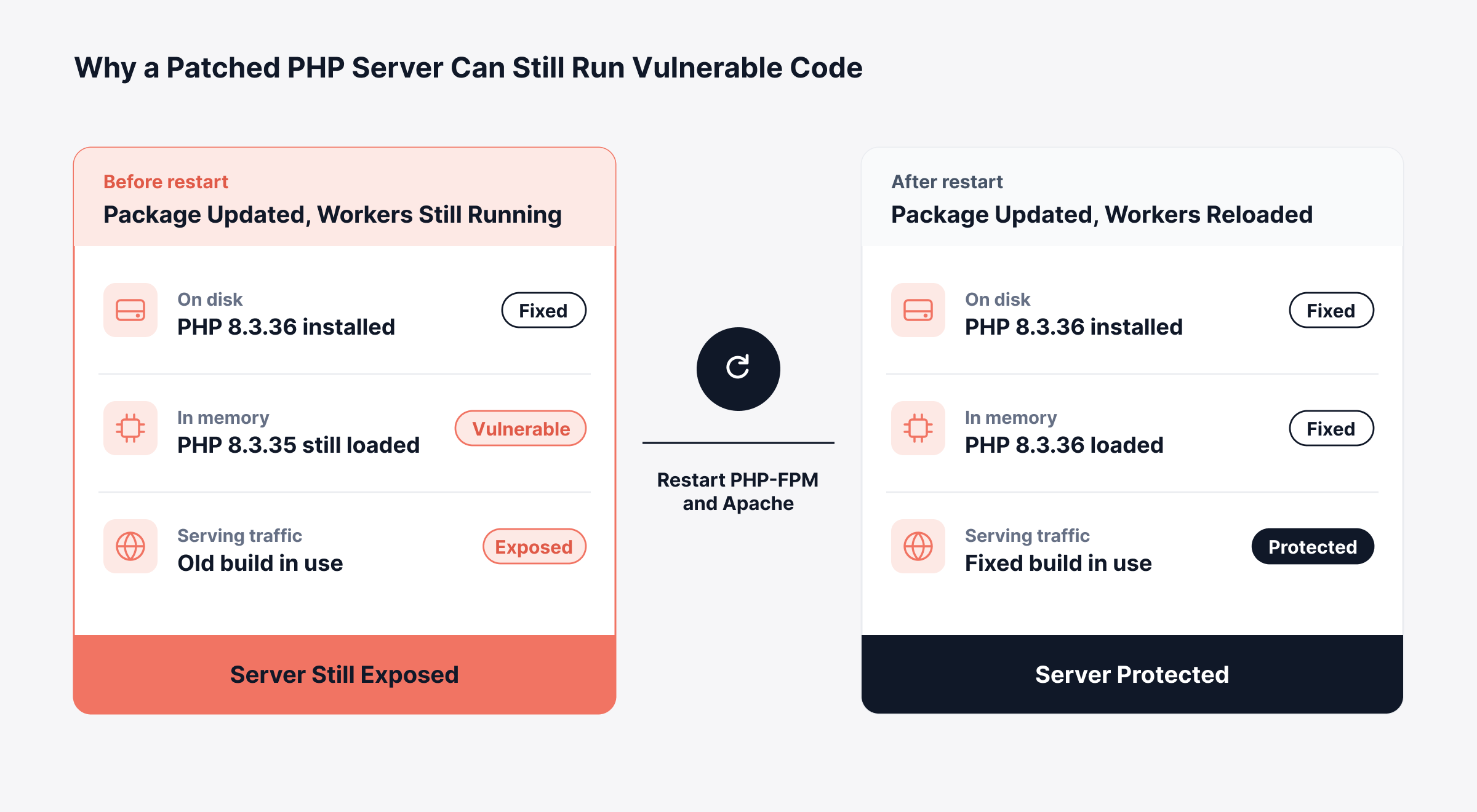
Restart every PHP process: The old binary stays loaded in any worker that was running before the update. Restarting PHP-FPM pools and Apache clears it.
Record the change: Emergency change ticket in your change management process, with approvals, scope and timing noted.
Installing the fixed package changes the file on disk, but running workers keep the old build in memory until they restart, as the comparison below shows.
Restart commands for the common setups follow. Adjust the version number per server.
Platform | Command | Effect |
Debian, Ubuntu | systemctl restart php8.3-fpm | PHP 8.3 FPM restart; use your own version number |
RHEL, CentOS, Fedora | systemctl restart php-fpm | FPM restart, Red Hat family |
Debian, Ubuntu | systemctl restart apache2 | Apache restart, which reloads mod_php |
RHEL, CentOS, Fedora | systemctl restart httpd | Apache restart for the Red Hat family |
Behind a load balancer? Restart one node at a time so the app stays online throughout. Some servers will need longer, and for those, interim settings buy time.
Which PHP2Shell Mitigations Work Until You Can Patch?
Mitigations here are temporary settings that cut the risk on servers you can't upgrade straight away, and they only last until full vulnerability remediation is done. Think of a payment portal during peak trading, where a maintenance window today isn't realistic. Published guidance lists these settings for each flaw.
Setting | Interim Value | Targets | Trade-Off |
memory_limit | -1, set at pool or server level so applications cannot override it | CVE-2026-109618 | Removes PHP's per-request memory cap, so add a container or cgroup memory limit, which caps memory for a group of processes |
post_max_size | 8M if the app takes no uploads, 32M if it does | CVE-2026-109618 | Anything larger gets rejected |
session.upload_progress.enabled | 0, followed by a restart of every worker | CVE-2026-109619 | Upload progress tracking turns off |
fatal_error_backtraces | 0 on PHP 8.5, followed by a restart of every worker | CVE-2026-109619 | Only covers the confirmed backtrace path |
Once the upgrade checks out, put the normal memory settings back. Leaving the cap unlimited just swaps one risk for an availability problem. Verification is also where the evidence for every fix comes together.
How Do You Confirm PHP2Shell Is Fixed and Show Auditors the Proof?
Verification answers two questions per server: is the fixed PHP build installed, and has every process serving traffic restarted onto it? Four checks cover it:
Package check: Compare the installed PHP package with the fixed release, or with the vendor's backported build.
Process check: Run systemctl status and confirm PHP-FPM and Apache started after the package update.
Coverage check: Every host in the inventory needs a result. No result means you treat it as exposed.
Evidence check: Each change record should hold the approval, the deployment time and the verification output.
Six months on, an auditor asks when the payment portal was patched. If the change record holds the approval, the deployment window and the verification output, you can answer in a minute; a spreadsheet filled in from memory is much harder to defend. An audit log keeps that history together.
Was a Server Targeted? What Observability Data Can Tell You
Logs, metrics and process activity (together, a server's observability data) help with two things here: confirming patched servers are stable, and spotting whether anything was targeted before the fix. Nobody had published official indicators of compromise, meaning the specific traces an attack leaves, when this was written. Until they are, watch for the general signs of memory corruption attacks against PHP:
Worker crashes: PHP-FPM error log entries showing workers exiting on signal 11, a segmentation fault.
Memory exhaustion errors: Repeated "Allowed memory size exhausted" fatal errors triggered by unusual requests.
Suspicious requests: Spikes of oversized POST or multipart upload requests in the access logs.
Unexpected processes: Web workers spawning shells, or making outbound connections they never made before.
Seeing any of these on a server that was exposed before patching? Get a forensic review done, because the upgrade won't remove anything an attacker already planted. Rotate the stored credentials and API keys on those servers as well.
Reviews go faster when logs are already centralized. Alert rules for these patterns then keep watch after the incident closes, and our guide to security observability shows how logs, metrics and traces support this kind of investigation.
How Does Motadata Support an Emergency PHP Patch From Discovery to Proof?
At Motadata, this workflow spans two products. ServiceOps handles discovery, patching, change control and compliance reporting. ObserveOps watches logs and services on either side of the fix, and it can open ServiceOps incidents when something looks wrong.
1. Locating PHP and Ranking What to Fix First
ServiceOps discovery runs with agents or agentless scans and records installed software, which puts every PHP installation it finds in one list. Next, a missing patch scan compares each Linux server's OS, build version and installed applications with what's available. Covered distributions include Ubuntu, Debian, Red Hat, CentOS and SUSE, along with Oracle Linux, Rocky Linux and AlmaLinux.
Patches carry a Critical, High, Medium or Low rating. Servers get a label too (Highly Vulnerable or Vulnerable) from System Health Settings, based on thresholds you set. Add the CMDB relationship graph, which shows the business services relying on each server, and you're ranking by business impact as well as severity.
2. Testing and Deploying the Fix Under Change Control
Under the Test and Approve policy, an automatic patch test sends selected patches to a small group of endpoints first. If a patch installs cleanly across that group, it approves itself after however many days you've set. And when an emergency can't wait that long, the Manually Approve policy lets an administrator approve the fixed packages straight away.
Deployment policies control when the rollout actually runs: only on the days and within the time ranges you allow, with a warning to users first. A reboot policy can restart servers once installation finishes, which reloads PHP services along the way. Meanwhile, the default Emergency change type in ServiceOps change management keeps the approvals tied to the rollout through automated patch deployment.
The engineering details matter in mixed environments:
Remote offices: Branch servers pull patches from a local relay server. Less load on the central file server, less traffic over the WAN.
Air-gapped networks: No internet? An internet-connected bridge machine runs the offline patch sync, and the patches travel in on removable media.
Red Hat and CentOS: Downloaded patches are checked against Red Hat's published SHA-256 checksum before deployment.
3. Proving Completion for Audit
Each installed patch is verified after deployment, and Scan Now lets you recheck any computer whenever you need to. Deployments, failures and scans all go into patch audit logs. From that history, patch compliance reporting builds reports you can put on a schedule.
4. Spotting Exploitation Attempts in the Logs
ObserveOps server log management centralizes logs with search and live tail. You can set a log policy to match messages with chosen words, worker exit entries for example, and raise an alert when their count passes a threshold. The alert then goes to email, Microsoft Teams or Slack, can start a runbook, and (with the ServiceOps integration) can open an incident at the severity you set.
Fleet-wide version checks are a good job for SSH runbooks, which run one script across a group of Linux servers and parse whatever comes back. And if your PHP-FPM services use ObserveOps APM (PHP 8.1 and later is supported), fresh traces in APM Explorer tell you the service is handling requests again after the restart. Each of these settings is described step by step in the ServiceOps patch documentation.
What Belongs in a PHP2Shell Response Checklist?
A PHP2Shell response checklist confirms that every affected system is found, fixed, verified and documented before the incident is closed. Use these items as the closing criteria:
Inventory: Every server, virtual machine, container and vendor system that runs PHP is on the list, and each one has a named owner.
Exposure: Internet-facing systems and anything holding customer data were patched first.
Third parties: Written fix confirmations are in from every hosting provider and vendor.
Change record: An emergency change covers scope, approvals and timing.
Patch and restart: Fixed builds are installed, and every PHP service has restarted.
Interim controls: Mitigations on waiting systems are logged with a removal date.
Verification: Package and process checks pass on every host.
Log review: Servers exposed before patching have been checked for crash patterns and odd requests.
Evidence: Reports, change records and vendor emails in one folder an auditor can open.
Close PHP Exposure Faster With Motadata ServiceOps
PHP2Shell won't be the last critical flaw in shared software, and with AI speeding up research, the next one may come with even less warning. Recovery speed comes down to three things: how fast you find affected servers, how cleanly fixes move through change control, and whether you can prove the work is finished.
That's the job Motadata ServiceOps is designed for: asset discovery, severity-rated Linux patching, change records and patch compliance reports in one ITSM platform, with the evidence collected as the team works. There is a limit. ServiceOps patches PHP installed through a package manager, and source builds, vendor appliances and container images still need a rebuild or a vendor update.
FAQs
What is PHP2Shell?
It's the nickname for CVE-2026-109618 and CVE-2026-109619, two critical PHP engine flaws (9.2 on CVSS v4.0). Either one gives an attacker code execution on a web server, no login required. Secure application code is no defense here, because the bug is in PHP underneath it.
Which PHP versions fix PHP2Shell?
Which release you need depends on your branch: 8.5.12, 8.4.27, 8.3.36 or 8.2.35. Older branches (8.1, 8.0 and 7.4) are end of life, though PHP made an exception for this incident and published limited source backports. Servers on older branches should take a vendor backport where one exists and move to a supported release.
Does PHP2Shell affect WordPress and other CMS sites?
Yes, if the site's PHP version is unpatched. The flaws are in PHP itself, a layer below WordPress or any other CMS, and on managed hosting it's the provider's job to update PHP, so check their security notice. If you run the server yourself, update PHP and restart the service.
Is updating the PHP package enough?
No. PHP-FPM workers and Apache processes that were already running keep the old code in memory until they restart, so restart every service that loads PHP and check the start times afterwards. In Motadata ServiceOps, a deployment can include a scheduled reboot, which takes care of the PHP restart too.
What should we fix before the next critical PHP flaw?
Three things: a software inventory you trust, an emergency change path with maintenance windows agreed in advance, and verification as a standard step in every patch job. Motadata ServiceOps handles discovery, Linux patch deployment and compliance reporting in one platform, which shortens the time from disclosure to a verified fix.
Author
Poonam Lalani
Content Strategist
Poonam Lalani is a B2B content strategist and writer with a background in computer engineering and experience across enterprise technology domains, including AI, cloud, DevOps, data engineering, and IT operations. She specializes in creating research-driven content that simplifies complex ideas and supports product education, thought leadership, and business growth.