What is Jaeger Tracing and How does It Locate Slowdowns Across Microservices
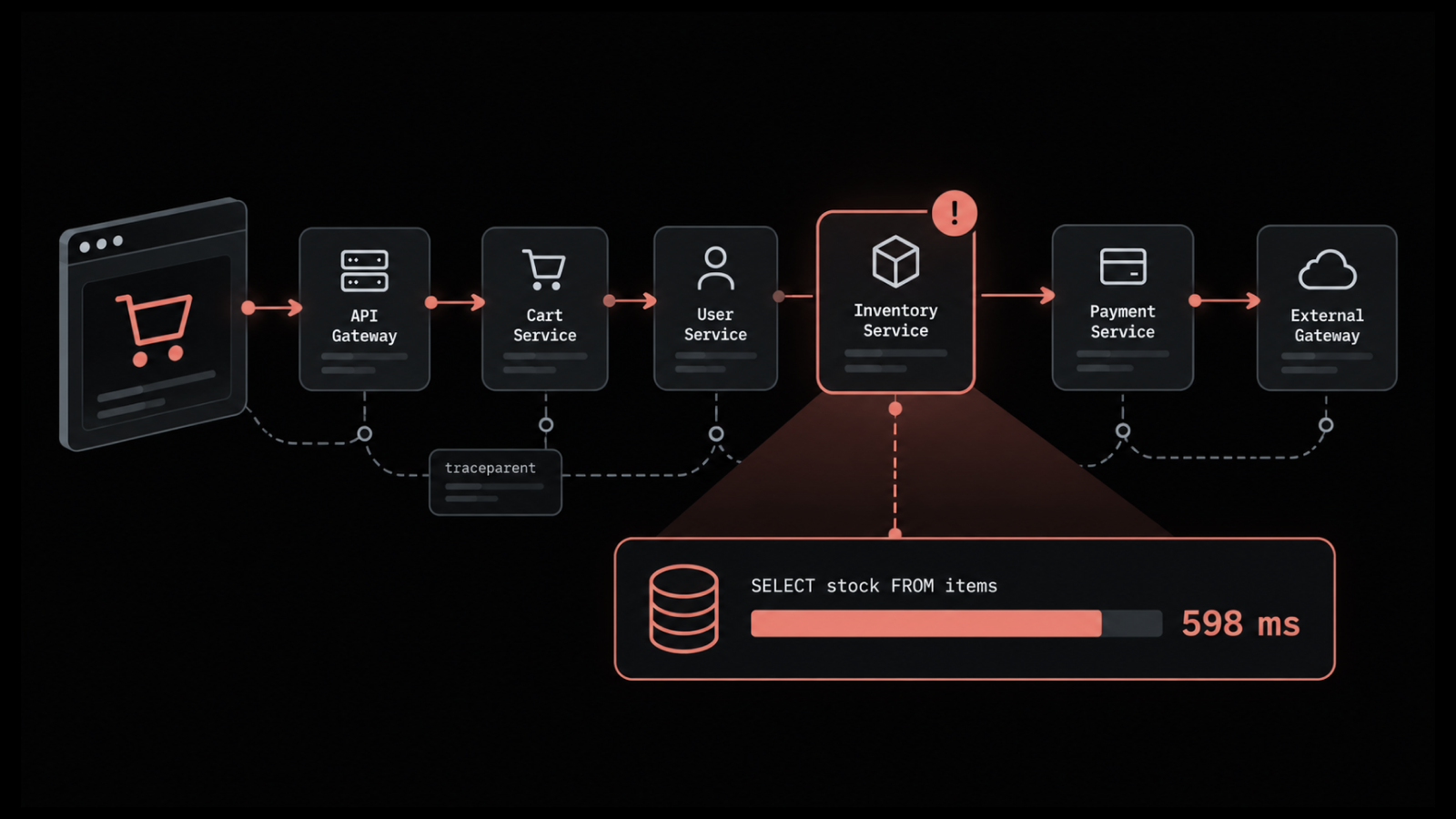
Why does a checkout or login take several seconds when CPU and memory look normal on every server? In microservices, one click can travel through a long chain of components before the user sees a response. Any one of them can hold the request up, and server graphs won't tell you which.
Logs show what each service recorded. Metrics give you averages. What's missing is the path one request took and the place it lost time, and Jaeger tracing records exactly that.
Jaeger has been around since 2015, and it's still one of the first tools engineers reach for when they start microservices monitoring. In this blog, you will see:
What Jaeger tracing is: Its origin, purpose and current status under the CNCF
How Jaeger works: Traces, spans, context propagation and the Jaeger v2 architecture
How to read and run it: Sampling choices, the Jaeger UI and a local setup with Docker
How Jaeger compares: Where it differs from OpenTelemetry, Zipkin and Prometheus
Where Jaeger stops: Its limitations, common rollout mistakes and when a full platform fits better
What is Jaeger Tracing?
Jaeger tracing lets you follow each request through a distributed system, one hop at a time, using an open-source tool that began at Uber and is now hosted by the Cloud Native Computing Foundation (CNCF). Your services send it spans. Jaeger stores them and draws each request as a timeline.
On that timeline, the slow service or the slow query stands out. If someone asks what is Jaeger distributed tracing, it's distributed tracing done with Jaeger as the backend. Some background on the project:
Origin: Built at Uber in 2015 to follow requests across a fast-growing microservices platform
Governance: Accepted by the CNCF in 2017 and graduated in 2019, the foundation’s highest maturity level, as only the seventh project to get there
License: Apache 2.0, which keeps Jaeger distributed tracing open source, free to download and free to self-host
Current design: Jaeger v2, released in November 2024, is built on the OpenTelemetry Collector framework and accepts OpenTelemetry data natively
In a software context, then, the short answer to what is Jaeger is a tracing backend. Metrics, logs and the instrumentation itself come from elsewhere in your observability setup. That narrow scope matters to IT leaders, because it decides what else you'll need to budget for, staff and run.
What is the Jaeger Tool Used For?
The Jaeger tool is used to find where a slow or failed request went wrong once it crosses service boundaries. You can also see how services depend on one another. Day to day, people rely on it for:
Latency analysis: Shows which span in a request consumed the most time, down to a single database query or outbound HTTP call
Error tracing: Follows a failure from the service that surfaced it back to the service that caused it, which speeds up root cause analysis
Service dependency mapping: Builds a graph of which services call which, using the trace data itself
Context propagation: Carries trace IDs and selected attributes, such as a tenant or order ID, across every hop
Service performance overview: Aggregates spans into request, error and duration metrics per service and operation
Why does Jaeger Tracing Matter to the Business?
Jaeger tracing matters to the business for one plain reason: You get from a slowdown report to a named cause sooner. Without traces, every service owner joins the incident call, since nobody can prove their part is fine. Meanwhile MTTD grows and revenue pages stay slow.
With a trace, the search shrinks to one service and one operation. You see the difference in three places:
Shorter incidents: Engineers start from evidence of where time went, so diagnosis begins sooner
Fewer escalations: Only the owner of the slow component needs to join the call
Better release decisions: Comparing traces before and after a deployment shows whether a change added latency
Who Uses Jaeger Tracing and What does Each Role Gain?
Most Jaeger tracing users build or run distributed applications, but the results travel further up the organization. Each role takes something different from the same trace data:
Developers: See how their code behaves across service boundaries and which calls slow it down
SREs and platform engineers: Find the failing hop during incidents and check latency against service-level objectives
Service owners: Confirm whether a release, a dependency or a third-party API caused a slowdown
IT leaders: Get clearer incident reviews and evidence for decisions on capacity, vendors and architecture
Jaeger usually covers just the tracing part of an application performance strategy. The next example shows what a single trace adds during an incident.
How does a Jaeger Trace Explain a Slow Order Confirmation?
A Jaeger trace explains a slow page by pointing to the span that held the time. Take a hypothetical online retailer: After a release, its order confirmation page goes from under a second to over two. Gateway metrics show the slowdown, yet they can't locate it.
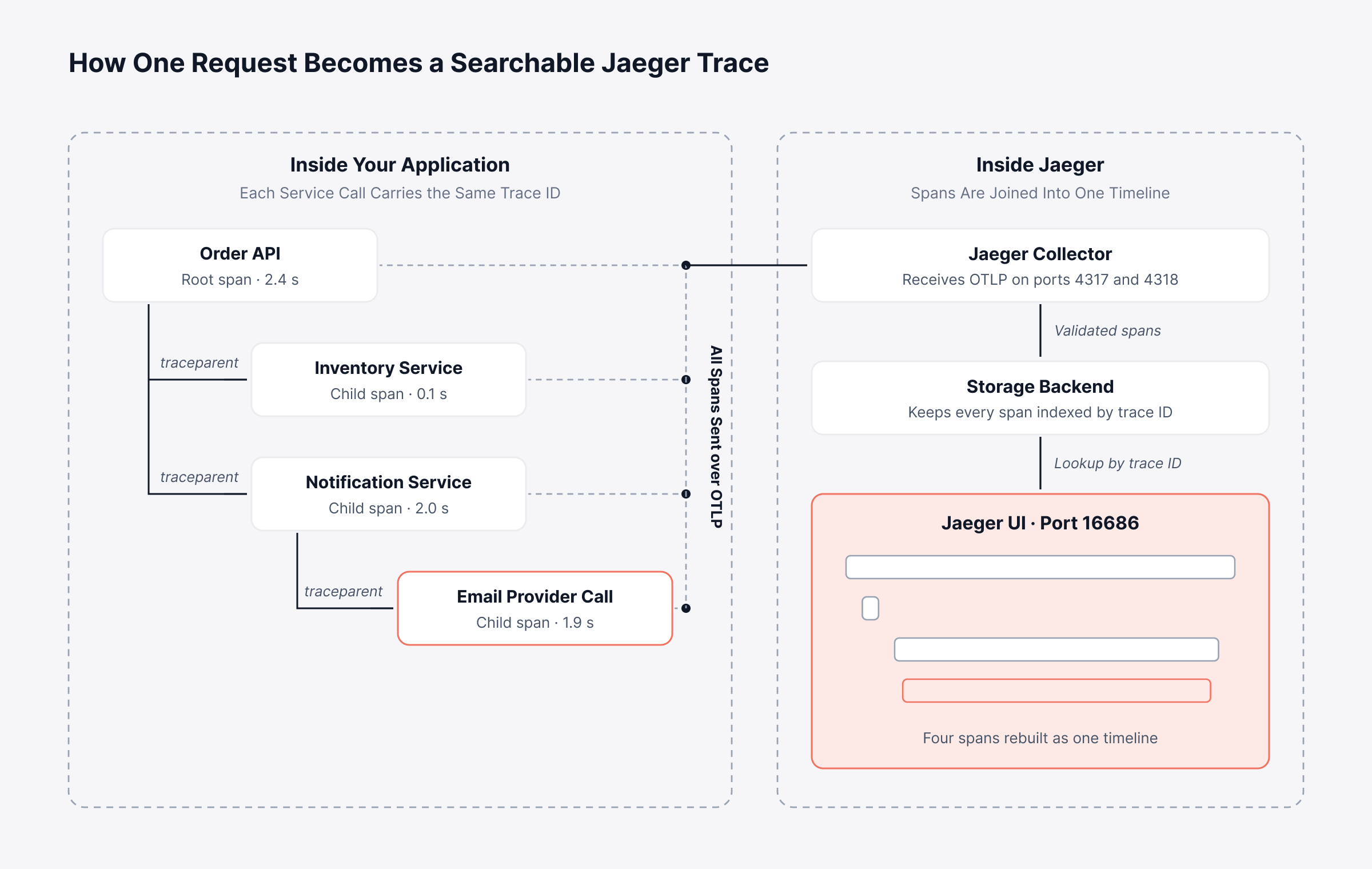
One slow order's trace has a 2.4-second root span. Inventory finishes in a tenth of a second, while notification takes two full seconds, nearly all of it spent waiting on an outside email provider. That release had moved the confirmation email into the request path, so sending it from a background queue again brought the page back.
How does Jaeger Tracing Work?
Jaeger tracing works by giving every request an ID that follows it from service to service. Each service writes down what it did, how long it took and what went wrong, and that record is a span. Getting from code to a finished timeline takes five steps:
Instrumentation creates spans: An OpenTelemetry SDK or auto-instrumentation agent in each service records a span for each operation, with a start time, duration and attributes
Context travels with the request: The trace ID and parent span ID move along in request headers, usually the W3C traceparent header, so the next service attaches its spans to the same trace
Spans are exported: Each service sends finished spans to Jaeger over the OpenTelemetry Protocol (OTLP), either directly or through an OpenTelemetry Collector that forms part of a wider telemetry pipeline
Jaeger stores the spans: The Jaeger collector validates and processes incoming spans, then writes them to the configured storage backend
Engineers query the trace: The query service and the Jaeger UI reassemble spans by trace ID and render them as a single timeline
Steps 1 to 3 belong to OpenTelemetry and steps 4 and 5 belong to Jaeger, which is why OpenTelemetry and Jaeger distributed tracing are usually taught as one OpenTelemetry Jaeger pipeline. Ask how does Jaeger work and you can boil it down to this: OpenTelemetry creates and sends the data. Jaeger stores it and shows it.
Keep the trace ID moving between services, or the request breaks into pieces that no longer connect. Below, one order request travels from instrumented code to a single searchable trace.
What are Traces and Spans in Jaeger?
A Jaeger trace covers one whole request, from first call to final response. Each span inside it is a single timed operation. Since Jaeger's original terms came from OpenTracing, the table also gives the OpenTelemetry name Jaeger v2 uses today.
Term | What it means | Example |
Trace | Every span produced by one request, grouped under one trace ID | One order confirmation from click to response |
Span | One timed unit of work with a name, start time and duration | A call from the order API to the inventory service |
Parent span | The span that triggered another span | The order API span that calls the notification service |
Attributes (formerly tags) | Key-value details attached to a span | http.status_code = 500, customer.tier = gold |
Events (formerly logs) | Timestamped notes recorded during a span | Retry started, cache miss |
Links (formerly references) | Connections between spans in different traces | A batch job linked to the requests that queued it |
Jaeger traces are far easier to read when every service names its attributes the same way. We come back to this under rollout mistakes. Before that, let's look at the components that collect and store spans.
What are the Core Components of Jaeger Architecture?
Jaeger architecture in v2 has five moving parts: Instrumentation in your services, a collector, storage, a query service with the UI, and an optional Kafka ingester. Jaeger itself ships as a single program. You start it as a collector, a query service or an ingester, and every one you run needs its own sizing and patching.
1. Instrumentation Through OpenTelemetry SDKs
Your own services create the spans, through OpenTelemetry SDKs or auto-instrumentation agents. Jaeger used to offer client libraries written for the OpenTracing API, but the project archived them. If you still have Jaeger OpenTracing code, plan to replace it, and use OTel SDKs that export OTLP for anything new.
2. Jaeger Collector
The collector takes in spans and writes them to storage. OTLP arrives over gRPC on port 4317 or HTTP on port 4318. It will also take Zipkin-format spans on port 9411 and older Jaeger formats from legacy services.
Jaeger v2 is itself a custom build of the OpenTelemetry Collector, so a separate OTel Collector is optional. Plenty of organizations add one anyway. That way metrics and logs can go to other tools through the same collector.
3. Jaeger Storage Backends
Storage is pluggable in Jaeger. It's also where most of your long-term running cost ends up. Jaeger supports these backends:
OpenSearch: A primary distributed backend, which the Jaeger project recommends over Cassandra for large-scale production
Cassandra: A primary distributed backend suited to high write volumes
Badger: An embedded key-value store for single-node deployments at modest volumes
Memory: For development and testing only, since data disappears on restart
ClickHouse: Available as an experimental backend behind a feature gate
Remote Storage API: A gRPC interface for connecting backends the project does not support directly
4. Jaeger Query Service and UI
The query role powers the Jaeger UI and serves its APIs. It answers trace searches, reassembles spans by trace ID and powers the dependency and performance views described below.
5. Jaeger Ingester and Kafka Buffer
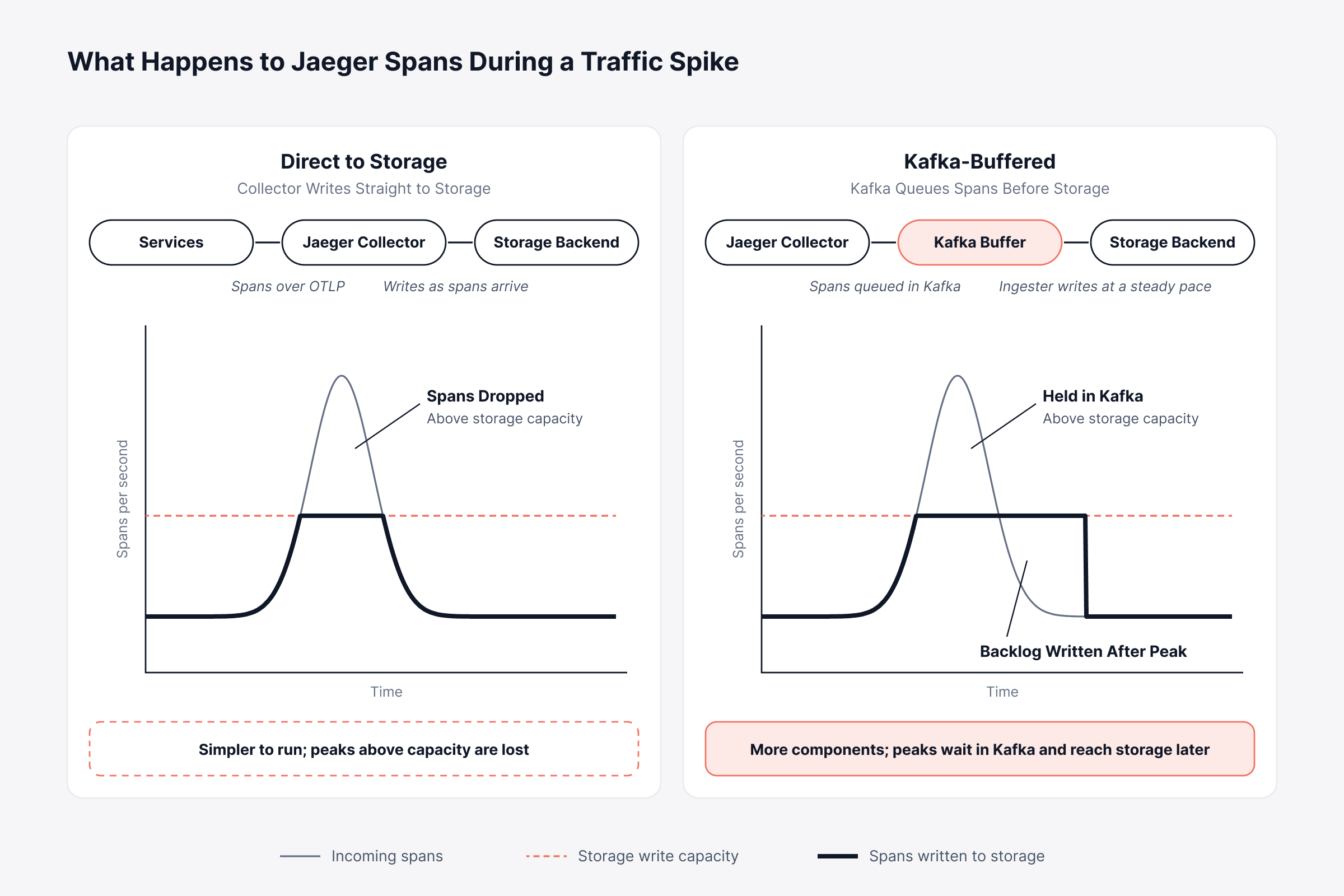
The Jaeger ingester is optional. You'd add it when trace volume gets large enough that storage can't take writes as fast as spans arrive. Kafka holds the overflow, and ingesters drain it into storage at a safe rate.
Check how spiky your trace traffic is before you choose a pattern, because spans that arrive faster than storage can write them get lost. The charts below separate what happens to spans in each pattern when traffic jumps above storage capacity.
Developers usually start with the all-in-one role, a single process with the collector, query service and UI, keeping data in memory. Pair it with Badger and it can handle modest production traffic on a single node. All of these roles belong to Jaeger v2, which raises a common question about older deployments.
Is Jaeger Still Supported After the Move to Jaeger v2?
Jaeger is still supported, with active maintenance under the CNCF and Jaeger v2 as the current line. Only two older pieces were retired. First the Jaeger client libraries gave way to OpenTelemetry SDKs, and then v1 itself reached end of life at the end of 2025.
People asking whether Jaeger is deprecated usually have v1 in mind. That version is retired along with its clients, and v2 is where all new releases land. This table compares the two.
Area | Jaeger v1 | Jaeger v2 |
Core framework | Separate Jaeger binaries for agent, collector, query and ingester | One binary with roles, built on the OpenTelemetry Collector framework |
Instrumentation | Jaeger client libraries, now archived | OpenTelemetry SDKs and auto-instrumentation |
Host agent | jaeger-agent receiving spans over UDP | The OpenTelemetry Collector takes over the agent role |
Configuration | Command-line flags and environment variables | YAML configuration in the OpenTelemetry Collector format |
Tail-based sampling | Not built in | Available through the OpenTelemetry Collector tail sampling processor |
Support status | End of life at the end of 2025 | Current line, receiving features and security fixes |
Most of the work in moving to Jaeger v2 is in configuration and instrumentation. A typical migration runs in four steps:
Inventory instrumentation: List every service still using Jaeger client libraries or the jaeger-agent
Switch to OpenTelemetry SDKs: Replace Jaeger clients with OTel SDKs that export OTLP
Replace the agent: Run an OpenTelemetry Collector where jaeger-agent used to run, or export straight to Jaeger
Translate configuration: Rewrite v1 flags as v2 YAML and test against the same storage backend before cutover
The Jaeger documentation has a migration guide with sample configuration for every role. Once you're on v2, the next call is how much trace data to keep.
How does Jaeger Sampling Work?
Jaeger sampling sets the share of traces you store. Store all of them and costs climb quickly, while storing too few can mean the one failed checkout you need is missing. Jaeger has five main strategies, and the main difference between them is timing.
Strategy | When the decision is made | How it works | Trade-off |
Probabilistic | At the start of the trace | Keeps a fixed share of traces, such as 1 in 10 | Simple, but may drop rare slow or failed requests |
Rate limiting | At the start of the trace | Keeps a steady number of traces per second | Predictable volume, same blind spot for rare errors |
Remote | At the start of the trace | SDKs fetch per-service and per-endpoint policies from Jaeger | Central control without redeploying services |
Adaptive | At the start of the trace | Jaeger recalculates probabilities to hit a target samples-per-second rate | Self-tuning, but needs a supported sampling store |
Tail-based | After the trace completes | The OpenTelemetry Collector keeps traces that match rules, such as errors or high latency | Keeps the important traces, at higher memory and processing cost |
When no sampling configuration is supplied, Jaeger's remote sampling defaults to probabilistic sampling at 0.1%. That's fine for a quick test, though too thin for endpoints that see little traffic. Every extra point of sampling also adds storage and compute cost, the same trade-off behind log sampling.
Most production setups combine several of these in one Jaeger sampling policy:
Keep every error: Use tail-based rules so failed requests are always stored
Raise coverage on critical paths: Sample checkout, login and payment endpoints at higher rates
Keep the default low elsewhere: Hold background and health-check traffic to a small share
The traces that survive sampling all end up in the Jaeger UI. Most investigations begin there.
What Can You See in the Jaeger UI?
The Jaeger UI runs in a browser, on port 16686 by default, and it's where most tracing work happens. A typical session starts with a search and a trace timeline and sometimes moves on to a side-by-side comparison or the service dependency graph. These are the views you'll use most:
Search: Filters traces by service, operation, attributes, duration and time window
Trace timeline: Shows every span in one trace as horizontal bars on a shared time axis, with attributes and events for each span
Trace comparison: Places two traces side by side to show which spans were added, removed or slowed
System architecture: Draws a dependency graph of services from collected traces, similar to a service map
Monitor tab: Shows request rate, error rate and duration percentiles per service and operation, derived from span data, when Service Performance Monitoring is enabled
The Monitor tab needs extra setup. One way to feed it uses the OpenTelemetry span metrics connector to turn spans into metrics for a Prometheus-compatible store. The other computes them at query time from OpenSearch.
How do You Read a Jaeger Trace Timeline?
To read a Jaeger trace timeline, find the span that took longest, then figure out why it waited. Four steps cover most cases:
Check the root span duration: This is the total time the user waited
Find the widest child span: The longest bar usually points to the slow service or call
Look for gaps: Empty space between spans often means queueing, retries or work that was never instrumented
Open the span details: Attributes such as status codes, query text or endpoint names explain why the span was slow
Averages hide your slowest requests. Start trace searches from P99 latency outliers instead, since those are the ones customers notice.
Open every trace review at the widest bar, since that's usually where the answer is. Below is the slow order confirmation from earlier as Jaeger shows it, with the page target marked.
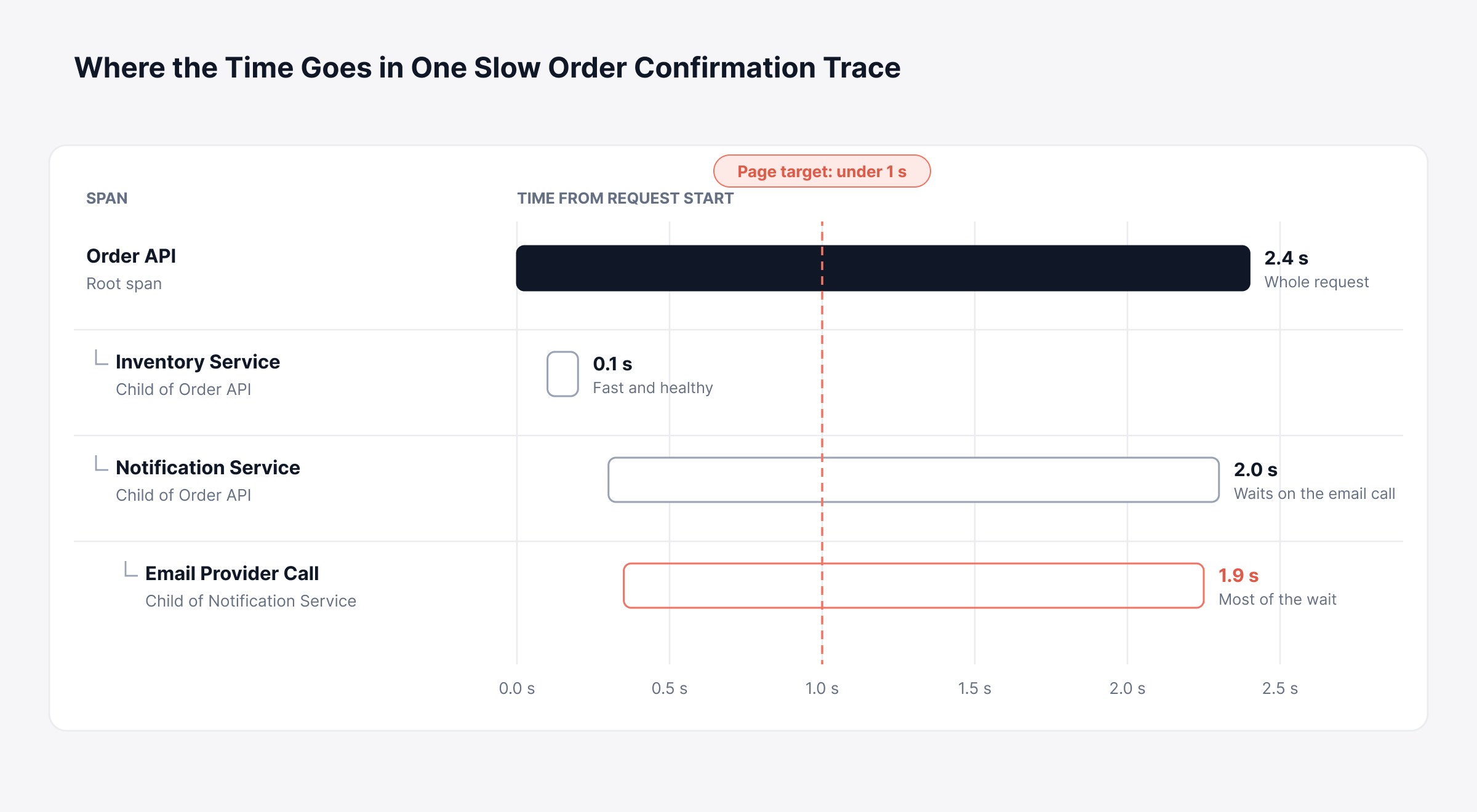
Seen like this, the fix is plain: Move the email call out of the request path. The inventory service can stay as it is.
How do You Run Jaeger Tracing Locally?
You can run Jaeger tracing locally in one Docker container, with the collector, query service and UI inside and storage kept in memory. It's the cheapest way to try Jaeger before you commit servers to it. These commands cover a basic Jaeger Docker setup.
Step | Command | What it tells you |
Pull the image | docker pull jaegertracing/jaeger:latest | Downloads the single Jaeger v2 image |
Start Jaeger | docker run -d --name jaeger -p 16686:16686 -p 4318:4318 jaegertracing/jaeger:latest | Runs collector, query service and UI with in-memory storage |
Check the container | docker ps --filter name=jaeger | Shows whether Jaeger is running and which ports are mapped |
Read startup logs | docker logs jaeger | Confirms the OTLP receivers started without errors |
Open http://localhost:16686 and you'll see the Jaeger UI, empty for now. Two OpenTelemetry environment variables are enough to point a service at Jaeger's OTLP HTTP port.
Platform | Command | What it tells you |
Linux or macOS | export OTEL_EXPORTER_OTLP_ENDPOINT=http://localhost:4318 | Sends the service's spans to local Jaeger |
Linux or macOS | export OTEL_SERVICE_NAME=order-api | Sets the service name shown in Jaeger search |
Windows PowerShell | $env:OTEL_EXPORTER_OTLP_ENDPOINT="http://localhost:4318" | Sends the service's spans to local Jaeger |
Windows PowerShell | $env:OTEL_SERVICE_NAME="order-api" | Sets the service name shown in Jaeger search |
Restart the service from that same shell and send it a few requests. Within seconds, its name should show up in the Jaeger UI search list. For a ready-made demo, the project's HotROD sample app, a mock ride-booking service, produces realistic traces.
It also helps to know Jaeger's default ports. They're the first thing to check when a firewall or Kubernetes service blocks traffic.
Port | Protocol | What it handles |
4317 | gRPC | OTLP span ingestion |
4318 | HTTP | OTLP span ingestion at /v1/traces |
9411 | HTTP | Zipkin-format span ingestion |
5778 | HTTP | Remote sampling strategies for SDKs |
16685 | gRPC | Query API |
16686 | HTTP | Jaeger UI and its JSON query API |
Remember that the local setup keeps traces in memory, so a restart wipes them. For production, add persistent storage, resource limits and retention rules. On Kubernetes, Helm charts or operators help it fit your existing Kubernetes monitoring practice, and from there the question becomes how Jaeger works with the other open-source tools you run.
How is Jaeger Different from OpenTelemetry, Zipkin and Prometheus?
Jaeger overlaps with only one of these three tools. OpenTelemetry is the source of the telemetry, and Prometheus is a metrics store. Zipkin is closest to Jaeger, as an older tracing backend with much the same purpose.
Tool | Primary role | Data it handles | How it relates to Jaeger |
Jaeger | Tracing backend with storage, search and UI | Traces | The system this guide covers |
OpenTelemetry | Instrumentation standard, SDKs and collector | Traces, metrics and logs | Feeds trace data into Jaeger over OTLP |
Zipkin | Tracing backend with storage, search and UI | Traces | An alternative backend; Jaeger can also accept Zipkin-format spans |
Prometheus | Metrics database and query engine | Metrics | Stores the span-derived metrics behind Jaeger's Monitor tab |
Jaeger vs OpenTelemetry
In the OpenTelemetry vs Jaeger comparison, the two work as a pair. OpenTelemetry runs inside your code and sends telemetry out. Jaeger receives the traces so you can store and search them.
So most setups run both. In a typical Jaeger OpenTelemetry pipeline, every service carries an OTel SDK and Jaeger stores what they send. Anyone who already runs the OpenTelemetry Collector will find a Jaeger OTel deployment familiar, because Jaeger v2 is built on it.
Zipkin vs Jaeger
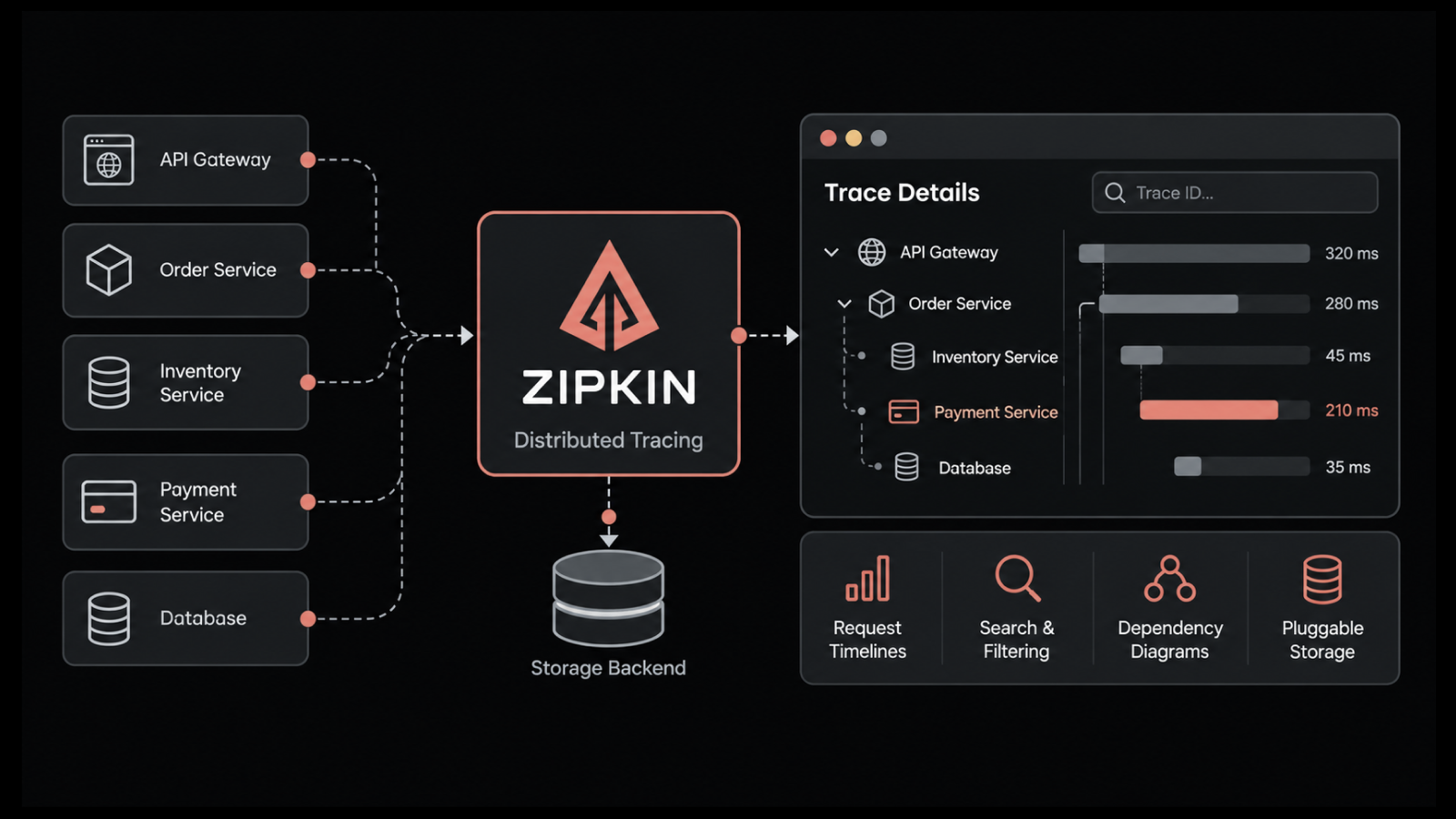
On Zipkin vs Jaeger, both are free, open-source tracing backends with the same basic purpose. Twitter released Zipkin in 2012, about five years before Jaeger joined the CNCF. Both now take data from services instrumented with OpenTelemetry.
Zipkin is often the easier choice for Java-heavy systems that already pass B3 headers. Jaeger suits OpenTelemetry-first setups on Kubernetes, particularly where adaptive sampling helps. Our Zipkin guide covers that comparison from the Zipkin side.
Jaeger vs Prometheus
Jaeger vs Prometheus compares two kinds of data. Prometheus keeps numbers over time, such as request rate or memory use, and fires alerts at set thresholds. Jaeger keeps the path and timing of each sampled request.
A metric tells you latency went up. A trace shows the request and span behind the rise, so the two work together, much like logs and metrics do. Each tool handles one signal well, and that brings us to Jaeger's limits.
What are the Limitations of Jaeger Tracing?
Jaeger tracing's main limitations come from its narrow focus on traces. Everything else in an observability practice has to be built and run around it. These five come up most:
Traces only: Logs, infrastructure metrics and network data need separate tools and separate storage
Self-hosting effort: Someone has to deploy, upgrade, scale and secure collectors, query services and storage
Storage cost and expertise: OpenSearch and Cassandra clusters need tuning, capacity planning and retention management as trace volume grows
No built-in alerting: Jaeger shows traces on request, and alert rules and paging have to come from another system
Limited infrastructure context: A slow span may be caused by a busy host, a restarting container or a congested network link, none of which the Jaeger UI shows
Here's a second hypothetical case: A SaaS provider keeps seeing a slow database span during its overnight batch window. Jaeger points at the query. The cause turns out to be a backup job filling the database host's disk, something only infrastructure metrics show, so two owners spend the incident comparing separate dashboards.
What does Jaeger Cost to Run in Production?
Jaeger is free to license. In production, you pay for the servers and the people who run it. The main cost drivers are:
Compute: Collectors, query services and ingesters that scale with trace volume
Storage and retention: Cluster capacity that grows with sampling rates, retention periods and high-cardinality attribute values
Engineering ownership: Upgrades, scaling, security patching and on-call cover for the tracing stack itself
Integration work: Links between traces, logs, metrics and alerting tools that have to be built and maintained
Migrations: Periodic changes such as the move from Jaeger v1 to v2, which take planned engineering time
Budget reviews tend to miss these costs because no vendor sends a bill for them. Skipped basics during rollout make them grow faster.
What Mistakes Slow Down a Jaeger Rollout?
Small oversights cause most Jaeger rollout trouble, such as one service left uninstrumented or a sampling policy nobody wrote down. Fixing these early costs much less than fixing them after go-live. Six mistakes appear repeatedly:
Broken context propagation: Message queues, background jobs and older HTTP clients can drop the traceparent header, splitting one request into several unrelated traces
Head sampling that discards errors: A low probabilistic rate can drop the rare failed request you most need to see
Inconsistent names: Services that label the same attribute differently make search unreliable, so adopt OpenTelemetry semantic conventions early
Sensitive data in attributes: Email addresses, tokens or payment details recorded on spans create compliance exposure
No retention plan: Keeping every trace indefinitely drives storage cost up without improving diagnosis, so set trace retention the way you set log retention
Clock drift between hosts: Unsynchronized clocks misplace spans on the timeline, so keep time synchronization running on every node
Most of these problems disappear with a one-page instrumentation standard covering propagation, naming and redaction. Keep it current as new services join the request path. With that in place, you can judge whether Jaeger alone meets your needs.
When is Jaeger Enough, and When do You Need a Full Observability Platform?
Jaeger is enough for organizations whose main need is finding the service that slowed a request, provided someone has time to run it. If incidents keep pulling in host, log and metric data too, a full observability platform will serve you better.
For distributed tracing, Jaeger fits well when:
Scope is traces: Engineers mainly need request-level latency and error paths
Platform skills exist: Someone already runs OpenSearch or Cassandra and can own another stateful service
Budget favors open source: Engineering time is easier to find than license spend
A unified platform fits better when:
Incidents cross layers: Slowdowns often trace back to hosts, containers, databases or the network, which calls for unified observability
Many tools slow investigations: Engineers switch between separate consoles for traces, logs and metrics during every incident
Alerting and reporting matter: Service owners and managers need alerts, dashboards and service-level reporting from the same data
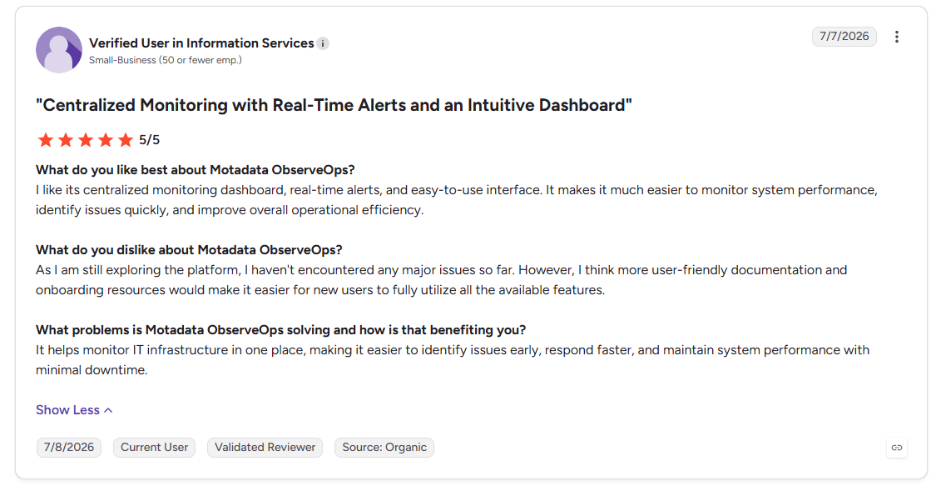
Finding problems quickly is the outcome that matters most here. This is what one of our users says about Motadata ObserveOps on G2:
Move from Traces-Only Debugging to Full-Context Root Cause Analysis with Motadata ObserveOps
Jaeger is a capable tracing backend, and it's free. A single product group with platform engineers and only tracing needs may not require anything else. Problems appear once the cause of a slow span is outside the trace, for example a busy host or a congested network link.
Motadata ObserveOps keeps tracing on open standards and adds the surrounding context in one place:
Open instrumentation: OpenTelemetry-native monitoring through a single agent, with code-free eBPF capture as an option for supported services
Trace analysis: ObserveOps distributed tracing with Span View, a trace scatter plot for outliers and database calls linked to the traces that issued them
Dependency context: Automatic dependency mapping built from span data
One investigation workspace: Movement from a trace to errors, host metrics, logs, databases and JVM insights with code-level visibility
Shared incident timeline: Log correlation that places log events, metric anomalies and trace failures in order
The aim is to explain a slow request from the user's click down to the host and query behind it, without stitching consoles together during an incident.
FAQs
Is Jaeger deprecated?
No. Jaeger remains an actively maintained, graduated CNCF project, and Jaeger v2 is the current release line. Its original client libraries were archived in favor of OpenTelemetry SDKs, and the Jaeger v1 line reached end of life at the end of 2025, so older deployments should plan a move to v2.
What does Jaeger mean?
Jaeger is the German word for hunter, a fitting name for a tool that tracks requests down to the operation that slowed them. In software, Jaeger refers to the open-source distributed tracing platform that Uber created and later donated to the Cloud Native Computing Foundation.
Is Jaeger free to use?
Yes. Jaeger is open source under the Apache 2.0 license, so there is no license fee. The costs come from the compute, storage and engineering time needed to run collectors, query services and a storage backend, and those costs grow with trace volume and retention.
Can Jaeger run on Kubernetes?
Yes. Jaeger is widely deployed on Kubernetes using Helm charts or operators, with collectors scaling horizontally and storage running as a separate stateful service. Services in the cluster send spans over OTLP, often through an OpenTelemetry Collector deployed as a sidecar, a DaemonSet or a central gateway.
Does Jaeger replace an APM tool?
Jaeger covers the tracing part of application performance monitoring but leaves out metrics, logs, alerting and infrastructure context. Many organizations pair it with other tools or move to a unified platform such as Motadata ObserveOps, which connects traces with host metrics, logs and database performance in one workspace.
Author
Poonam Lalani
Content Strategist
Poonam Lalani is a B2B content strategist and writer with a background in computer engineering and experience across enterprise technology domains, including AI, cloud, DevOps, data engineering, and IT operations. She specializes in creating research-driven content that simplifies complex ideas and supports product education, thought leadership, and business growth.