DNS Monitoring: What to Track and Where to Watch It From
DNS monitoring asks your name servers the same question on a timer and checks the answer that comes back. Most teams aim it at their public domain and stop there.
That covers half the problem. Your public domain and your internal resolver fail in different ways. A check from outside the building never sees the second one.
In this blog, you'll see:
How authoritative and recursive DNS break differently, and who notices each one.
What SERVFAIL means that NXDOMAIN does not.
Which six signals deserve an alert, and where to set each one.
By the end you'll know which half of your DNS nobody is watching.
What Is DNS Monitoring?
A DNS check sends a query and reads the reply. The reply can fail three ways. It never arrives, it carries a value you did not put there, or it takes long enough that users notice.
Queries leave on port 53. UDP handles ordinary lookups, and TCP takes over when an answer outgrows a single datagram. DNS over TLS moves to 853, while DNS over HTTPS hides inside ordinary 443 traffic.
Your monitoring holds an expected value for each record and compares what arrives against it. Anything that fails to match raises an alert.
Two kinds of check exist. One queries from outside your network. The other queries from a machine inside it, and the two catch completely different faults.
DNS earns the attention because it fails quietly and takes everything with it. Nothing on your network reports itself as down when resolution breaks. Nothing works either.
Your Two DNS Systems Fail in Completely Different Ways
Almost every company runs two kinds of DNS. Most monitoring gaps start by treating them as one system.
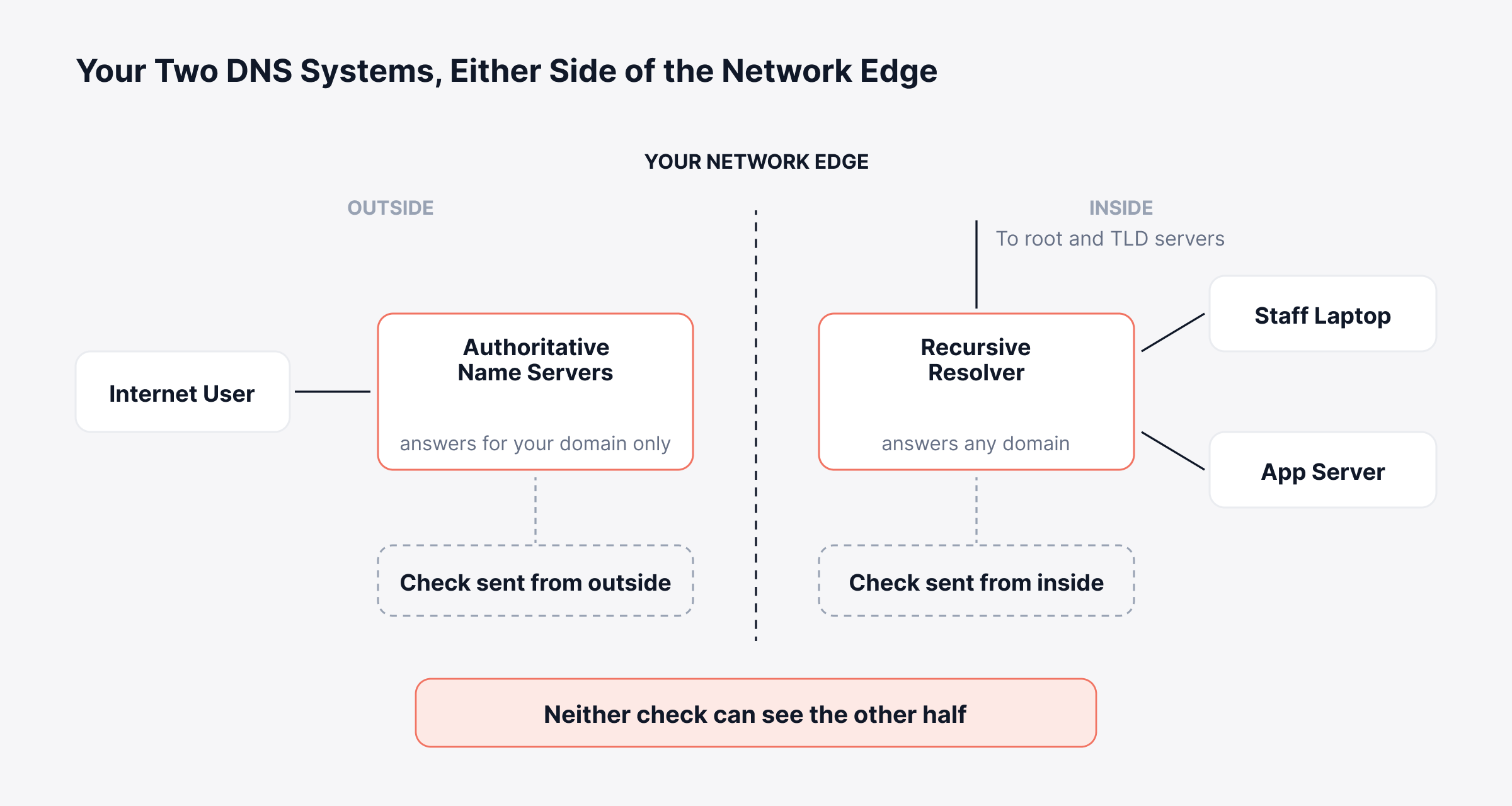
Authoritative DNS answers the rest of the internet when it asks about your domain. Recursive DNS, usually called the resolver, answers your own staff and servers about any domain at all. In a Windows estate that resolver normally runs on a domain controller.
The diagram below puts both halves either side of your network edge. Each one has its own check.
Authoritative DNS | Recursive DNS (the resolver) | |
Answers for | Your domain, to anyone on the internet | Any domain, to your users and servers |
Usually run by | Your registrar, your DNS provider, or your own name servers | You, on-site, or your ISP, or a public resolver |
Who notices a failure | Your customers. Nobody inside the building | Your staff and your servers. No customer |
Typical failure | A wrong record, a failed zone push, an expired DNSSEC signature | Resolver down, upstream forwarder unreachable, poisoned cache |
What to watch | Record values, SOA serial, NS delegation, signature expiry | Query latency, SERVFAIL rate, cache hit rate, upstream reachability |
Vantage point that catches it | A query sent from outside your network | A query sent from inside, against the resolver your users actually use |
The vantage-point row matters more than the rest. A synthetic check from a provider's global network proves your public records resolve correctly from Frankfurt. It says nothing about the resolver your finance team uses.
The reverse holds as well. Your internal check stays green while a stale record at your registrar sends customers to an address you decommissioned months ago.
Watch both halves, each from the side that can see it.
What Does DNS Monitoring Track?
DNS monitoring tracks four groups of signals, which cover most of what matters. Most setups stop after the first two.
1. Availability. Does the server answer at all? A dead name server announces itself faster than anything else on this list.
2. Resolution time. How long passes between query and reply? This one drifts instead of breaking, so a baseline matters more than a fixed number.
3. Answer correctness. Did the record come back with the value you expect? An A record pointing somewhere you did not choose does more damage than any slow lookup. A check that only asks whether the server replied will call this one healthy.
4. Response codes. What did the server actually say? These carry the diagnosis.
Which Records Actually Need Watching?
Tracking every record type in a large zone produces noise. Five carry most of the risk.
Record | What it does | What breaks if it goes wrong |
A and AAAA | Maps a name to an IPv4 or IPv6 address | The site resolves to the wrong host, or to nothing |
MX | Names the mail servers for the domain | Inbound email stops, usually with no obvious alert |
NS | Delegates the zone to its name servers | Resolution fails intermittently as resolvers try a dead server |
CNAME | Points one name at another | A chain breaks, or a lookup loops |
SOA | Carries the zone serial and the refresh timers | Secondaries stop pulling updates and drift out of sync |
MX deserves a specific mention, because its failures stay so quiet. Mail stops arriving. The bounces go to senders you never hear from, and the first report lands as a customer asking why nobody replied.
Our DNS records entry lists the rest if you need the less common types.
What Do DNS Response Codes Tell You?
Every reply carries a four-bit response code in its header. RFC 1035 named them, and four of the sixteen turn up often enough to recognize on sight.
Code | What the server said | Usual cause | Whose problem |
NOERROR (0) | The name exists, here is the answer | Normal. An empty answer section still returns NOERROR | Nobody, unless the answer itself is wrong |
SERVFAIL (2) | Something broke on my side | An unreachable upstream, or DNSSEC validation that failed | The resolver, or the zone's signatures |
NXDOMAIN (3) | That name does not exist | A typo, a deleted record, or a name that was never there | The zone owner, or whoever typed the name |
REFUSED (5) | I will not answer you | An ACL blocking the client, or a resolver closed to that source | Configuration on the server |
SERVFAIL and NXDOMAIN deserve separating. A user reports the same thing either way, because the page fails to load.
They mean opposite things. NXDOMAIN shows your infrastructure telling the truth, while SERVFAIL shows it failing and admitting so.
NOERROR with an empty answer section has its own name, NODATA. The name exists and holds nothing of the type you asked for. Quite a few mail failures turn out to be an MX lookup coming back exactly like that.
Give the SERVFAIL rate on your own resolver a dashboard of its own. Healthy resolvers return almost none, so any sustained climb points at an upstream path or a validation problem. That climb usually arrives before anyone files a ticket.
Why DNS Monitoring Matters for Security
DNS sits in front of everything, so attackers reach it early and defenders can read it early.
1. Record Tampering
An attacker holding your registrar password reroutes your traffic without touching a server you own. Your firewall and your SIEM both stay quiet, because nothing inside the perimeter moved.
A value-comparison check catches that within one polling interval. An availability check never will. The record resolves perfectly, just somewhere else.
2. Expired DNSSEC Signatures
Every RRSIG carries an explicit expiry timestamp. When one lapses, resolvers that validate start handing out SERVFAIL for your domain.
Your zone stays correct and your records stay right. The signature over them went stale, which takes you off the internet for anyone who validates.
Alert seven days ahead, because expiry announces itself no other way.
3. DNS as a Covert Channel
Query patterns carry security signal too. A workstation generating thousands of lookups for long random subdomains behaves like malware using DNS to move data out.
A DNS sinkhole becomes the usual control once you can see that traffic.
4. The Registrar Account
Most record tampering starts with a stolen login at the registrar, not with anything clever aimed at your name servers. No amount of monitoring on your own infrastructure prevents that, which is exactly why change alerting earns its place. You cannot stop the edit, so you need to hear about it within minutes.
Encrypted DNS complicates this honestly. When clients resolve over DoH to a public provider, your internal resolver stops seeing their queries. So does your monitoring.
What Should You Alert On?
DNS generates enough signal to drown a team. Six deserve waking somebody.
Signal | Alert when | Why this one |
Resolution time | Above your normal p95 for three consecutive checks | One slow query is noise. A sustained shift is a real change |
SERVFAIL rate | Any sustained rise above baseline | A healthy resolver returns almost none of these |
Record value | Any change you did not schedule | A hijack and a careless edit look identical here |
SOA serial | It moves with no change ticket, or stops moving after one | Catches unplanned edits and failed zone pushes together |
DNSSEC signature | Seven days before an RRSIG expires | Expiry gives no warning of its own, and the failure is total |
NS delegation | Parent and child NS sets disagree | A silent fault that can survive for months |
Teams skip the SOA serial check and then wish they had not. That number increments every time the zone changes, which turns it into a free audit log.
If the serial moves and nobody opened a ticket, somebody edited your zone. A change that went in while the serial stayed put on your secondaries means the push failed. Those servers now hand out yesterday's answers.
Set thresholds from your own baseline, never from a round number. Resolution time that counts as slow on a local resolver reads as normal for a query crossing an ocean.
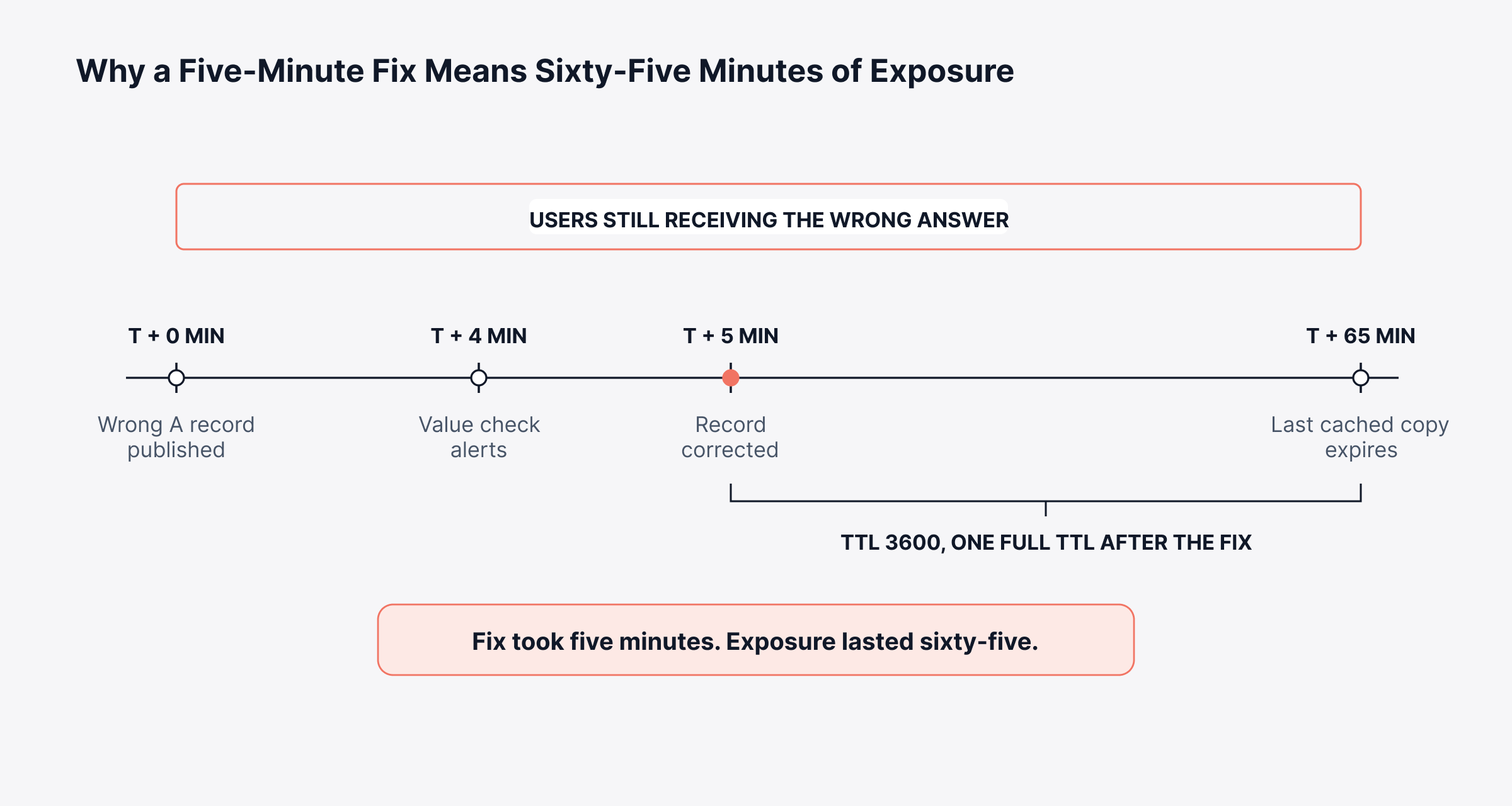
TTL decides how long your mistake outlives the fix. The rest of the internet keeps serving your old answer until each cached copy expires.
A record you correct in thirty seconds still reaches users as the wrong value for the length of that TTL. Catching the change early beats fixing it fast.
The timeline below runs that arithmetic on a one hour TTL.
How Do You Monitor the DNS Servers You Run?
We should be clear about which half of this we solve. ObserveOps runs no hosted network of global probes. Checking how your domain resolves from thirty countries needs a different tool.
We cover the DNS infrastructure inside your estate, which most platforms treat as an afterthought.
1. Service Checks From Inside Your Network
ObserveOps supports DNS and Domain as service check types, alongside Ping, Port, URL, NTP and SSL Certificate. Each check queries the resolver you point it at and verifies what comes back.
Those checks run from Motadata collectors sitting in your own network. They query your resolver exactly as your staff do. A branch collector tests the branch resolver, which catches a fault that exists at one site only.
2. The Server Underneath the Service
The host gets watched as a server at the same time. CPU, memory and disk on the machine running your DNS role sit beside the service check. A resolver slowing down because its host ran out of memory then reads as one story.
Windows estates gain more from this than it sounds. DNS and Active Directory share a host, so one problem is frequently the other.
Our Microsoft Active Directory and Windows DNS integrations cover that pairing.
DNS then stops being a separate dashboard. It sits beside the switches and servers it depends on in one unified observability platform. A resolver failure then traces back to the uplink that caused it.
ObserveOps runs wherever you need it, on-premises or in a private or public cloud account you own. The collectors live wherever your DNS does.
How Do You Set DNS Monitoring Up?
Six steps produce a useful setup without drowning anyone in alerts.
List both halves first: Write down your authoritative name servers and every resolver your users point at. Branch offices hide more resolvers than anyone expects.
Record the expected answers: Capture today's value for each record you care about. A value check needs a baseline to compare against.
Check from both sides: Query your public domain from outside. Query your resolvers from inside.
Baseline before you threshold: Run for two weeks and read your own p95 resolution time. Thresholds picked any earlier are guesses.
Add the quiet ones: MX records and DNSSEC expiry give no symptoms at all until the day they give a crisis.
Route alerts by half: Authoritative faults go to whoever holds the registrar login. Resolver faults go to your network team.
Baselining does more than it looks. A round number gives you constant alerts or none at all, and both outcomes teach people to ignore DNS alerts.
Check your TTLs before you tune intervals. A resolver that caches aggressively answers from memory, and then you are measuring the cache instead of the server.
Watch Both Halves, Not Just the Public One
Most DNS monitoring setups watch the public domain carefully and the internal resolver not at all. Outages land the other way round. A resolver failure stops your staff working immediately, while a record problem takes a TTL to spread.
Start with the two lists. Check each from the side that can see it. Baseline before you set a threshold. The quiet signals belong on the list even though they have never fired once.
If your DNS runs on servers you own, it belongs beside them. Have a look at how network performance monitoring handles the infrastructure underneath.
FAQs
What is DNS monitoring?
DNS monitoring queries your name servers on a timer and checks the answer against the value you expect. It covers the authoritative servers that answer for your domain and the resolvers your own users query.
How often should DNS checks run?
One to five minutes suits most authoritative record checks. Resolver latency benefits from something tighter. Keep the interval longer than your record TTLs, since anything shorter measures the cache.
What is the difference between DNS monitoring and uptime monitoring?
Uptime monitoring asks whether the server answered. DNS monitoring also asks whether the answer was right. A hijacked record resolves perfectly and still sends your traffic somewhere you did not choose.
Can DNS monitoring detect a hijacked domain?
A value-comparison check will, since it holds your expected record and compares every answer against it. An availability check will not, because a tampered record still resolves and still returns quickly.
Does encrypted DNS break monitoring?
It limits visibility instead of breaking it. When clients resolve over DoH to a public provider, those queries bypass your internal resolver. You keep server-side monitoring and lose the per-client query view.
Author
Ramya Shah
Technical Writer
Ramya Shah is a technical content writer with a computer engineering background and roots in automotive journalism. He covers IT Service Management, observability, IT operations, and AI-driven automation. An early adopter of AI-assisted writing workflows, he turns complex IT processes into clear, engaging content optimized for search and answer engines (AEO), lifting content output and organic visibility.